Zhenzhen's AI Radar · Flux.3 Klein · 2026-11-01 Morning Brief
This issue features 1 new versions: Strongly Recommended 0 · Recommended 1 · Worth Watching 0 · Listed Only 0
Editor's Note This issue reviews 1 new versions of Flux.3 Klein. The top recommendation is an editing model comparison workflow: using the same image and the same instruction, it simultaneously runs Flux.3 Klein edit, Qwen Image 2.1 edit, and Fibo 2 edit turbo, outputting a four-panel grid with the labeled original image plus three results; all 6 comparison examples are visible and include prompts, and all three sampling settings are written into the workflow, upgrading the rating from B to A. Its shortcomings are that the model card has only two sentences, does not list model download locations, and serves only selection comparison, providing no new capabilities itself.
Recommended (1)
[A] Qwen image 2.1 Edit vs Flux 3 Klein edit vs Fibo 2 edit turbo · v1.0
Workflow · New Model · Author def813 · Published 11-01 07:34 · Downloads 6
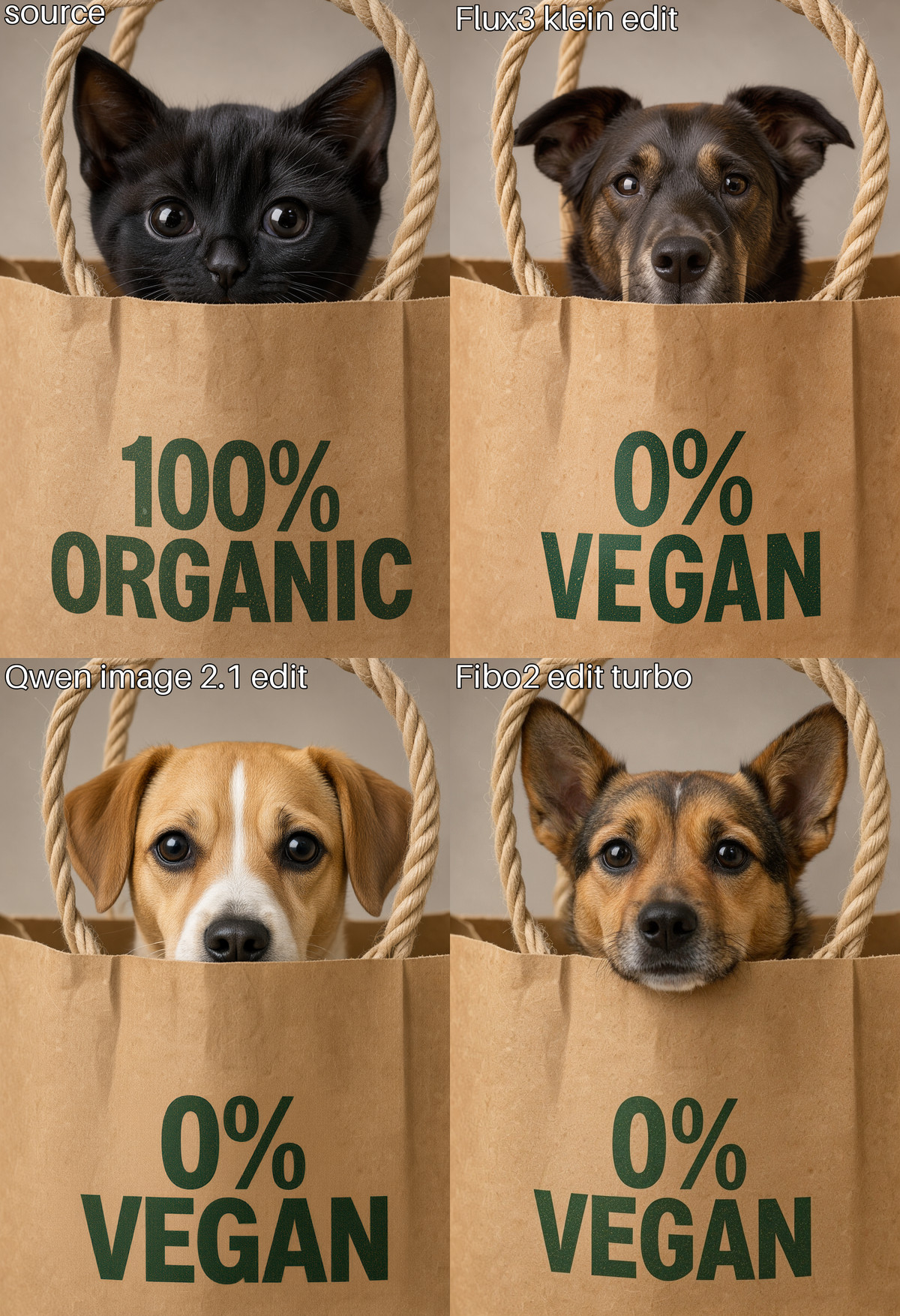
An editing model comparison workflow: using the same image and the same editing instruction, it passes them to Flux.3 Klein edit, Qwen Image 2.1 edit, and Fibo 2 edit turbo respectively, outputting a four-panel grid of "original image + three results" with labels.
Upgraded from B to A: The purpose is clear, all 6 comparison examples are visible and include prompts, and all three sampling settings are written into the workflow; what is missing is the model list on the card, and it serves only selection comparison.
Images
Reasons for Recommendation
- New model: Serves users who want to know how Flux.3 Klein edit differs from two other editing models on the same material and decide which one to use; the Klein route uses a distilled int8 base model, qwen3vl_4b text encoder, and flux2 VAE, performing edits using reference latents
- Each model has a toggleable prompt enhancement (off by default), output size can automatically follow the original image, and turning on the overlay switch adds labels to each panel
- All 6 visible examples are four-panel comparisons (changing packaging text, changing hairstyle and makeup, adding hat and sunglasses, converting to anime style, etc.), all with prompts; the author claims 4 images at 1024x1024 take about 20 seconds on 5070ti and about 40 seconds on 5060ti
How to Use
- Import qwenImage21EditVsFlux3_v10.json (48 KB), replace the source image in the LoadImage node, and write the editing instruction in the Prompt node; the author has not listed which nodes are required
- You need to prepare three sets of models: flux3-image-klein-int8-convrot + qwen3vl_4b_int8_convrot + flux2-vae; qwen_image_2.1_turbo_int8_convrot + qwen3vl_8b_int8_convrot + qwen_image_2.1_vae_bf16; fibo2_edit_turbo_int8_convrot + qwen3vl_4b_bf16; enabling prompt enhancement also requires their respective enhancement models, but the author has not provided download locations
Risks and Limitations
- The model card has only two sentences, with no model list or download locations; you must inspect the workflow yourself
- It is only a comparison tool and provides no new capabilities; the comparison conclusions represent only the few images selected by the author; real brand logos appear in the examples
- The license does not allow commercial use; there have been only 6 downloads in about 1 hours since publication; this entry only read the workflow content and was not run
Data: Civitai public API (base model Flux.3 Klein), inclusion window 10-31 20:31 → 11-01 09:01 (Beijing Time). Reasons for recommendation have been reviewed by editors; download counts represent only attention levels.