Zhenzhen's AI Radar · Flux.3 Klein · 2026-11-24 Morning Briefing
This issue features 1 new versions: Strongly Recommended 1 · Recommended 0 · Worth Watching 0 · Listed Only 0
Editor's Note This issue reviews 1 new Flux.3 Klein versions, listing S-tier models as top picks. Sint Angle is an editing LoRA for changing camera angles from a single image: input one image plus a fixed camera movement instruction to generate side, back, top-down, low-angle, or wide shots of the same character, outfit, and scene. The instruction list, strength, steps, sampler, CFG, and known issues are clearly documented, with 6 before-and-after examples provided. Limitations include that wide horizontal images barely rotate and must be cropped to square or vertical formats first; the license requires attribution, prohibits redistribution, and forbids using its outputs to train models.
Strongly Recommended (1)
[S] Sint Angle · Move the Camera in One Image - Flux.3 Klein · Klein 1.0
LoRA · New Model · Author AriaMaiven · Published 11-23 23:13 · Downloads 38
An editing LoRA for changing camera angles from a single image: give Flux.3 Klein one image and one camera movement instruction to output a scene with the same character, outfit, and location but a different camera angle—rotate 90 degrees left or right for a side view, 180 degrees for a back view, top-down from directly above, low-angle from ground level, or pull back for a wide shot.
Top pick for this issue's Flux.3 Klein: clear new capabilities, complete parameters and instructions, and all examples are before-and-after comparisons, meeting all criteria for S-tier.
Images
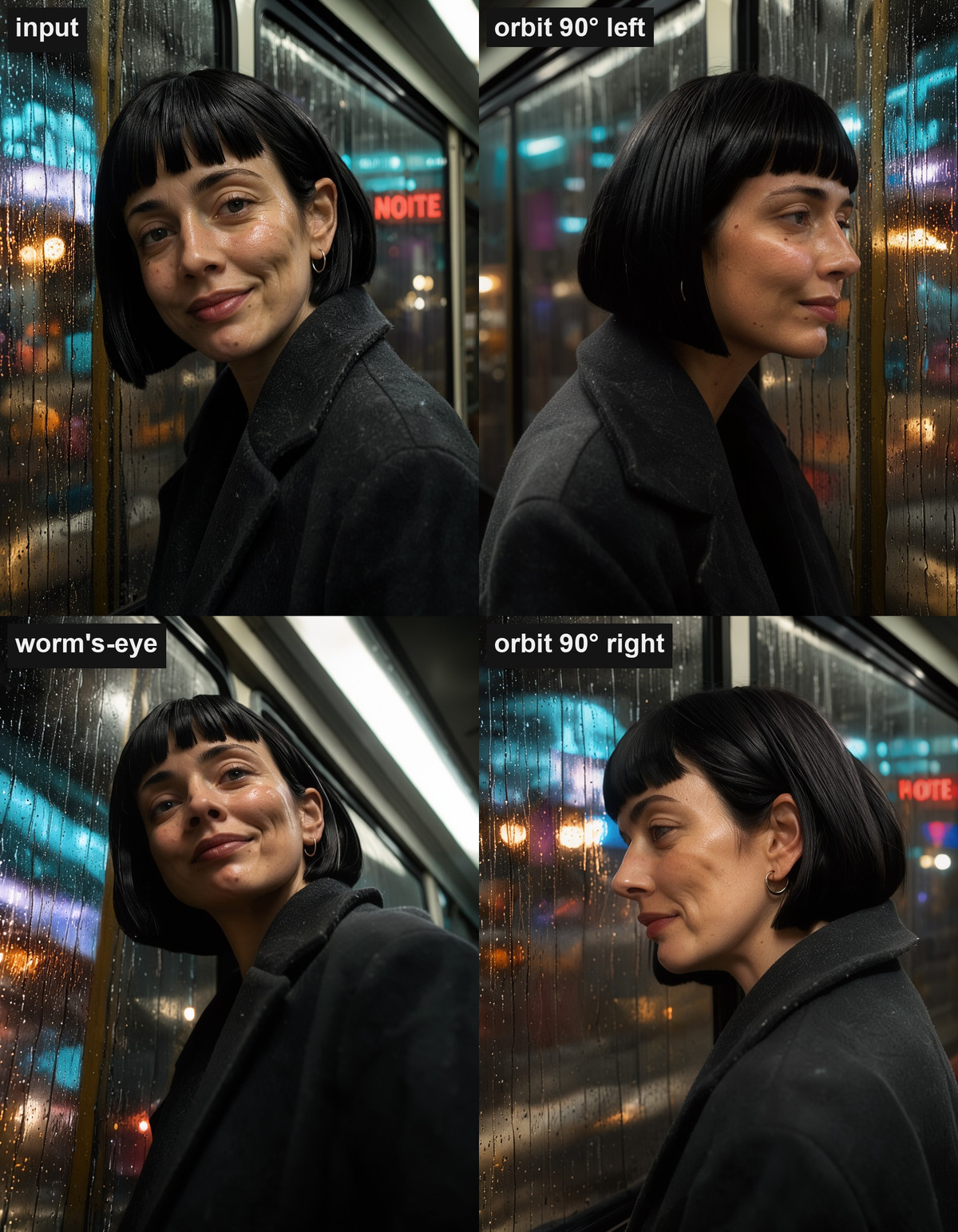
Reasons for Recommendation
- New capability: The author claims it can specify orbiting left or right, whereas the original Klein often rotates in the wrong direction; the character's face, hairstyle, clothing, and props remain consistent across angles, and the background rotates to reveal the other side rather than staying static behind the character
- Useful for reference image editing: Create multi-angle character sheets, fill in missing storyboard angles, or prepare first frames for image-to-video generation with different camera angles; the author states it works on photos, illustrations, and 3D characters on solid-color backgrounds
- Reliable execution: 6 fixed instructions are registered as trigger words, with strength 1.0; the author's test conditions were Flux.3 Klein distilled version, 16 steps, euler sampler, CFG 1, input image as the sole reference, and approximately 1 megapixels
- All 6 examples are visible and include prompts, all presented as "input / output" comparisons: realistic portraits (left/right orbit, low-angle, wide shot), grey-background 3D ranger (orbit 90 / 180 degrees, top-down, low-angle), and anime characters (top-down, low-angle, wide shot); free, with approximately 10 hours since release and 38 downloads
How to Use
- Load sint-angle-flux3klein-v1.safetensors (77 MB, BF16), strength 1.0
- Prompt order: <ref_image_1> → one full instruction sentence (e.g., Orbit the camera 90 degrees to the left around the subject, so we now see the subject in profile, facing the right edge of the frame) → one sentence describing the original image; the second half of the instruction, "what we now see," determines the direction and should not be deleted
- Other instructions: Orbit the camera 180 degrees around the subject… (back view), Raise the camera to a bird's-eye view… (top-down), Lower the camera to a worm's-eye view… (low-angle), Pull the camera far back to a wide shot of the whole place (wide shot)
- Use square or vertical input images; crop horizontal images to square or vertical first
Risks and Limitations
- Known issues listed by the author: wide horizontal images barely rotate; top-down views of full-body shots become directly overhead, while close-ups only achieve a moderate high angle; in busy scenes, seated people may only rotate to a three-quarter side view
- The license only permits image generation and on-site rental, requires attribution; the author states that redistribution or using its outputs to train other models requires prior permission
- Effect descriptions are as claimed by the author; this tool has not been run by us; examples only cover single-subject scenes
Trigger Words: Orbit the camera 90 degrees to the right around the subject, so we now see the subject in profile, facing the left edge of the frame, Orbit the camera 90 degrees to the left around the subject, so we now see the subject in profile, facing the right edge of the frame, Orbit the camera 180 degrees around the subject, so we now see the subject from behind, Raise the camera to a bird's-eye view looking straight down at the scene, Lower the camera to a worm's-eye view from the ground looking up at the scene, Pull the camera far back to a wide shot of the whole place
Data: Civitai public API (base model Flux.3 Klein), inclusion window 11-23 20:31 → 11-24 09:01 (Beijing Time). Recommendation reasons have been editor-reviewed; download counts only reflect attention levels.