Zhenzhen's AI Radar · MiniMax H3 · 2026-10-28 Morning Report
This issue features 4 new versions: Strongly Recommended 1 · Recommended 0 · Worth Watching 0 · Listed Only 3
Editor's Note This issue reviews 5 new H3 versions. The top pick is AusBoss's character sheet workflow: upload a single portrait photo, and H3 generates front, three-quarter, side, and back views of the same person. The model list, toggles, and notes are comprehensive, upgrading it from A to S. LongForge's long video workflow v7.2 adds "auto-export after generation," run reports, and loop exports; while functionally solid, it has many dependencies and only UI screenshots for examples, downgrading it from S to A. Studio Dials' workflow is merely a placeholder, requires a separately purchased core node pack, and includes real-person character options, downgrading it from B to C; two fictional character LoRAs remain at C.
Strongly Recommended (1)
[S] MiniMax H3 Character Sheet | Turnaround From One Photo · v1.0
Workflow · New Model · Author AusBoss · Published 10-27 23:38 · Downloads 218
A ComfyUI workflow for generating character sheets from a single image: load a portrait photo, and use H3's Ref2VA model to draw front, three-quarter, side, and back views of the same person, combined into one image.
Upgraded from A to S: Specific use case, complete steps and model list, visible examples, permissive license; the automatic rating was capped only due to few parameter entries.
Image
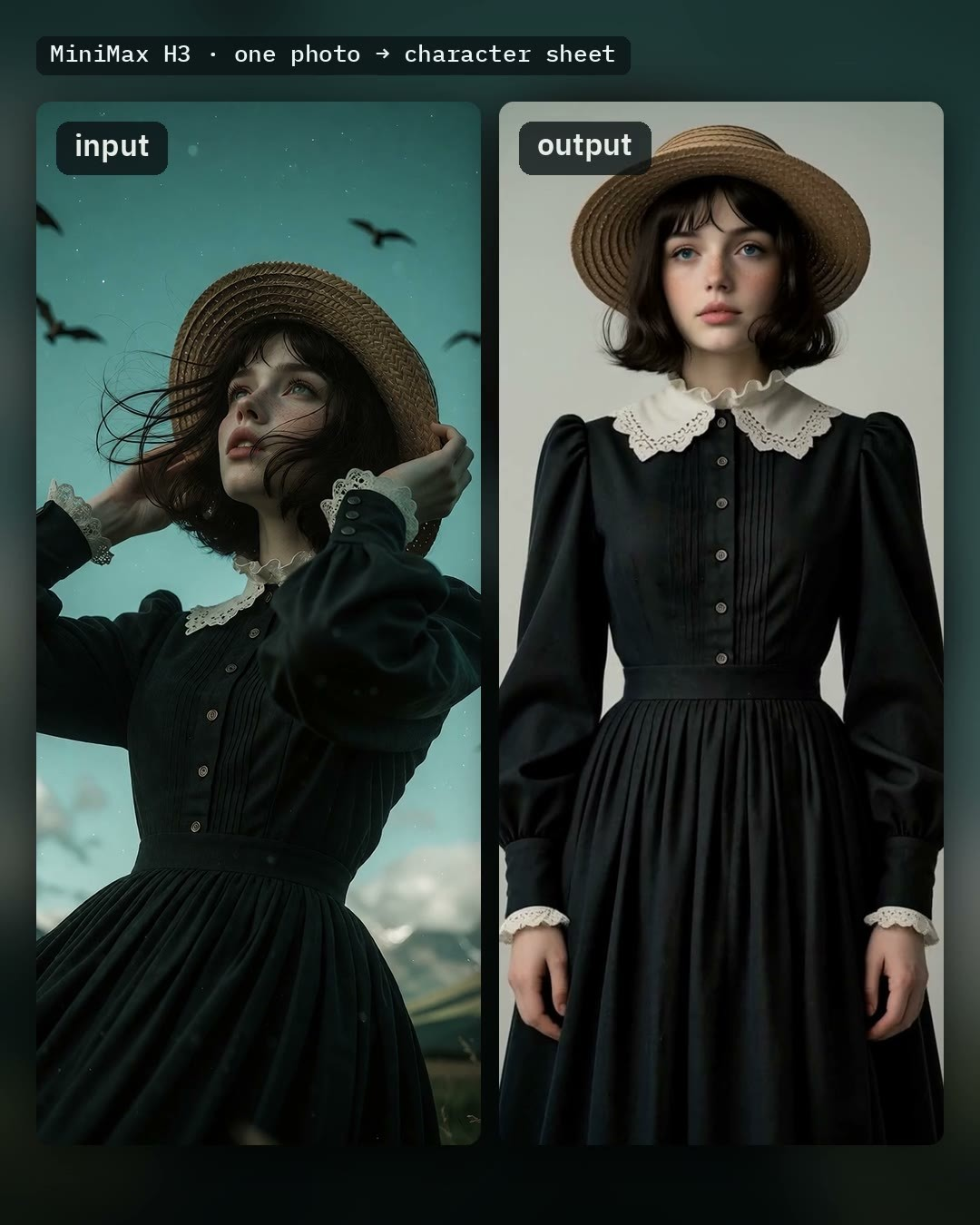
Reasons for Recommendation
- New capability: Get character turnaround sheets directly from a single photo, serving character consistency, modeling references, and pre-production for H3 reference-to-video generation.
- Missing parts in the photo (e.g., legs in a half-body shot) can be specified in the "What the photo doesn't show" box; the author claims writing "blue jeans and white sneakers" turns a bust shot into a full-body four-view sheet.
- Clear output specifications: One 3072 × 1536 image (each view 768 × 1536); enabling Upscale 2x uses SeedVR2 to enlarge to 6144 × 3072; optionally save each view separately or place the original photo on the left.
- Includes 1 example videos + 2 example images; free, license allows output, rental, and sale; 9 hours after publication, 218 downloads, 26 likes (indicating attention only).
How to Use
- Requires ComfyUI 0.30.0 or higher and AusBoss nodes 2.15.0 or higher (search for AusBoss in ComfyUI-Manager).
- Models: Place minimax_h3_ref2va_pruned_int8_convrot (Ref2VA version, not FL2VA, 20.97 GB) in diffusion_models, qwen3vl_32b_minimax_h3_nvfp4_awq (15.69 GB) in text_encoders, and minimax_h3_video_vae_fp16 (5.21 GB) in vae; for GPUs older than RTX 50, switch to the int8 text encoder.
- Load a clear, single-person photo; background is optional (leave blank for light gray), then click Run; default is 18 steps, 10 steps if Fast is enabled.
- LoRAs trained for H3 Ref2VA can be connected via the LoRA Loader in the workflow.
Risks and Limitations
- First run requires loading approximately 42 GB of models, resulting in high VRAM and disk space requirements.
- The back view is H3's guess based on the front photo; the author has only tested with real-person photos; strong colored lighting may be converted to standard studio lighting, and skin tone may lighten.
- Each separately saved view is a quarter of the full image, so wide sleeves at the edges may be cut off; converting half-body to full-body may lose small details, which need to be specified in the addition box.
- The author relays MiniMax H3 community license regional restrictions: does not cover the EU, UK, South Korea, and the US; generated content is similarly restricted.
Listed Only (3)
- Lora-Daddy H3 Studio Dials++ beta. + 25% off Halloween sale · v2.7 Beta — Workflow: Placeholder workflow v2.7 Beta for Lora-Daddy's H3 Studio prompt "dial" nodes: uses dropdown options to combine characters, films/TV shows, locations, camera movements, accents, music, effects, etc., to write H3 video prompts, and includes a chat assistant that can operate the entire node.

- Barbara Milf · MiniMaxH3 — LoRA: H3 version of the character LoRA for Barbara, an original fictional mature female character created by the author, used to reproduce this character in videos.

- Ashley Johnson · v1.0 H3 — LoRA: H3 version of the character LoRA for Ashley Johnson, an original fictional adult female character created by the author, used to reproduce this character in videos.
Data: Civitai public API (base model MiniMax H3), inclusion window 10-27 20:31 → 10-28 09:01 (Beijing Time). Recommendation reasons reviewed by editors; download counts indicate attention only.