Zhenzhen's AI Radar · MiniMax H3 · 2026-10-30 Evening Report
This issue features 8 new versions: Strongly Recommended 0 · Recommended 3 · Worth Watching 3 · Included Only 2
Editor's Note This issue reviews 10 new H3 versions, all of which are workflows and LoRAs, with no S-tier entries. The top recommendation is LongForge 7.3: a workflow suite for assembling long videos with audio by scene. This version allows direct upscaling or refinement of saved scenes without re-running the base generation, but it has a long dependency chain and an empty version notes section, so it maintains an A rating. Additionally, there is the one-stop Ultimate H3 workflow (A, MIT open source, requires the author's node pack) and SceneRef (upgraded from B to A), which uses Blender / Daz 3D scenes or real-world photos to set camera positions and character placements for regeneration. The DemonAlone FL2VA workflow v3.3 is only a minor update and has been downgraded from A to B; test3034 is a mid-training test upload and has been excluded.
Recommendations (3)
[A] MiniMax H3 LongForge FL2VA & REF2VA (LONG VIDEO) · LongForge v7.3
Workflow · Version Update · Author AIBOB1199 · Published 10-30 11:28 · Downloads 168
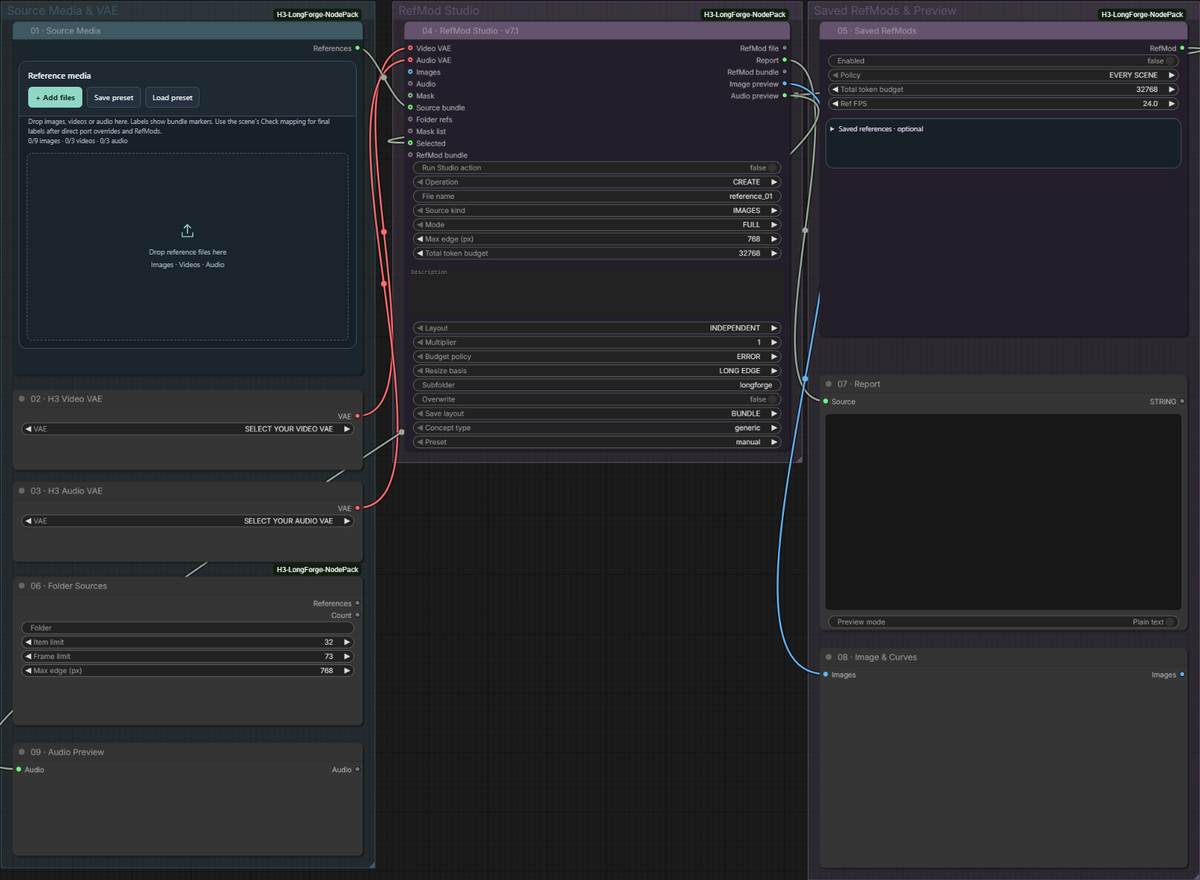
LongForge 7.3, a MiniMax H3 workflow suite for assembling long videos by scene (including its own node pack, main workflows for first/last frame and reference-to-video generation, and RefMod Studio), has added "individual high-definition processing for saved scenes" in this version.
Maintains A rating: The changes are clear, the operational path is detailed, and it offers practical secondary processing for users who have already generated videos; however, the dependency chain is long and examples are scarce, classifying it as a workflow rather than new weights.
Images
Reasons for Recommendation
- Version update: After generating a video at base resolution, you can apply UPSCALE or UPSCALE + REFINE to only a selected scene or the entire saved film, using the saved latents directly without re-running the base generation; the original video is retained in Saved chains.
- UPSCALE only performs latent space upscaling and does not run H3 diffusion; UPSCALE + REFINE then uses the refiner_model to refine each scene based on the saved prompts and seeds. The author states that the original audio track, duration, continuity context, and per-scene cropping are preserved.
- According to the full model card, this version also adds: replacing a middle scene while preserving subsequent scenes (REPLACE SELECTED), setting resolution by megapixels, automatic export after running all scenes, and run reports and loop exports (cross-fade / find similar frames / forward-reverse playback).
- Serves users who need multi-scene, long videos with audio using H3; free, with a license allowing image output and on-site rental; the entire model has accumulated 8640 downloads (indicating attention only).
How to Use
- Unzip minimaxH3LongforgeFL2VA_longforgeV73.zip, place the entire ComfyUI-H3-LongForge-NodePack into custom_nodes, install requirements.txt using ComfyUI's built-in Python, and additionally install ComfyUI-KJNodes and Veda-on-ComfyUI. After restarting, open the v7.3 main workflow and select the H3 main model, text encoder, and two VAEs in the initial model loading group.
- Single scene HD: Select the scene card → 13 · HQ Finish select UPSCALE or UPSCALE + REFINE → 10 · Action select HQ SELECTED → Run; Entire film: Action select HQ SAVED FILM → Run, then EXPORT FILM.
- The transition duration for loop exports is given by the author as 0,1–5 seconds (rounded to 24 FPS); the continuation method is selected in 11 · Video & Continuity. The author explains that the 22F under LAST FRAME is hidden context, not 22 images.
Risks and Limitations
- Heavy dependencies: The included node pack must match the workflow version 7.3, and requires FFmpeg, KJNodes, VEDA, and its predictors; if SageAttention is not available, 05–06 must be manually bypassed; HQ requires finding a compatible 3D latent space upscaling model separately.
- The author did not write update notes (the version notes section is empty); changes are documented in the model card. REPLACE SELECTED, loop exports, and JOINT audio refinement are marked as experimental features, with the author stating that perfect face consistency and invisible seams are not guaranteed.
- Only 1 images are visible as examples, with 6 sensitive-level examples hidden; this entry has not been run.
- Loop export BEST MATCH only supports videos under 120 seconds, and PING-PONG only supports videos under 60 seconds.
[A] Ultimate H3 Workflow (Stubelius) · v0.15
Workflow · New Model · Author Stuubzzz · Published 10-30 15:04 · Downloads 89
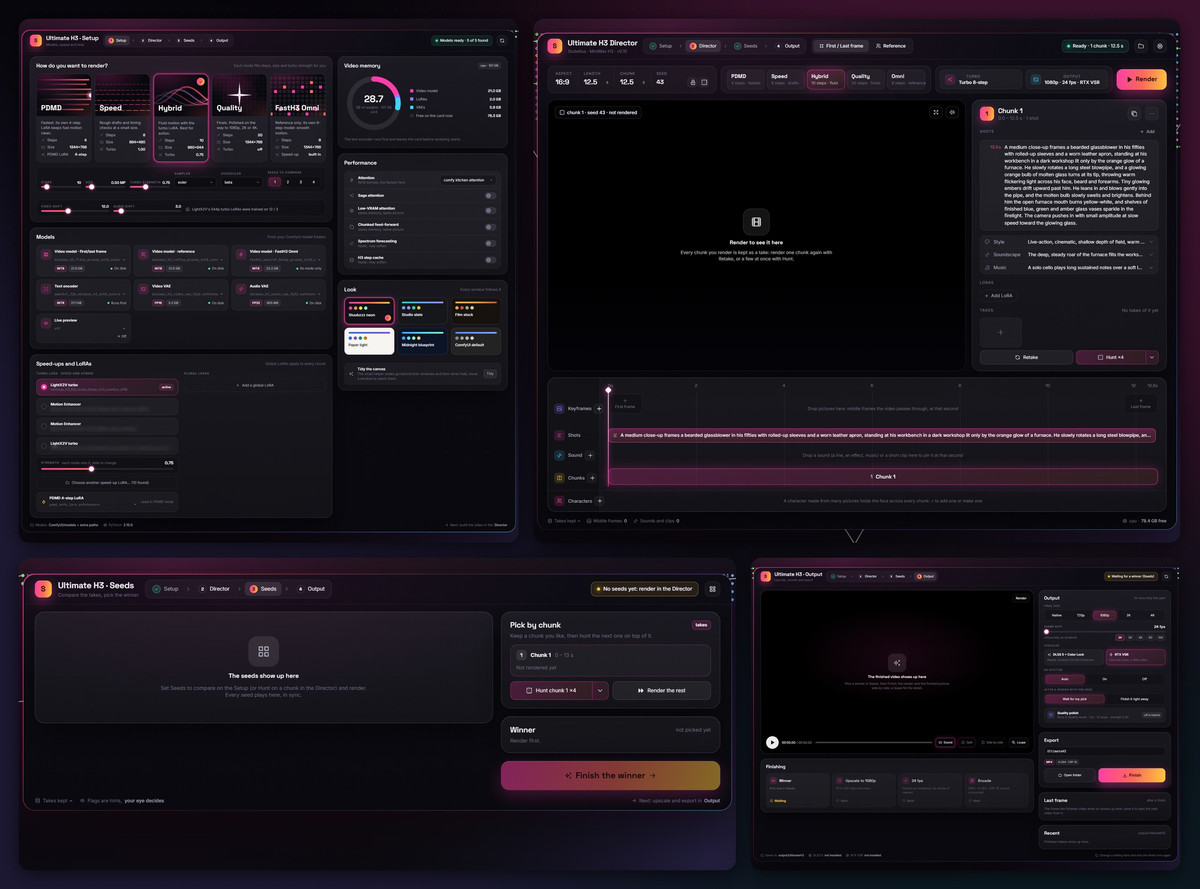
A MiniMax H3 ComfyUI workflow divided into four windows: Setup selects the generation tier, Director arranges the shot timeline, style, audio, and characters, Seeds compares 1–4 seeds side-by-side, and Output performs upscaling and frame interpolation only on the selected clip; it is not new weights itself.
Maintains A rating: The feature list is clear, installation steps and tier parameters are complete, and it is free and open source; however, it is only a workflow, depends on a dedicated node pack, and the on-site example is just one screenshot.
Images
Reasons for Recommendation
- New model (first upload, version v0.15): Integrates reference-to-video / first-last frame modes, long videos with multi-segment stitching, per-segment LoRA switching, dubbing and lip-syncing, and clip continuation into the same interface, suitable for users creating multi-shot short films with audio.
- Five tiers: Speed (approx. 480p, 8 steps), Hybrid (approx. 540p, 10 steps), Quality (approx. 768p, 20 steps), PDMD (approx. 768p, 4 steps), and the newly added FastH3 Omni in this version (approx. 768p, 8 steps, reference mode only). The author claims FastH3 Omni is approx. 10% faster than PDMD on 15-second clips.
- Generate 1–4 audio-enabled seeds side-by-side first, then select one to finalize. During the finalization stage, you can upscale to 4K and use RIFE to interpolate to any frame rate between 24–120; each segment can be re-rendered or have its seed changed individually, and all takes are preserved.
- Free, MIT open source, with a license allowing sales and sale of fusions; the author includes two YouTube tutorial videos (10-minute comparison, 22-minute window-by-window explanation).
How to Use
- First upgrade ComfyUI to 0.34 or higher (FastH3 Omni tier requires 0.42 or higher), install the author's Stubelius-Ultimate-H3 node pack via Manager's Install via Git URL and restart, then import ultimateH3Workflow_v015.json and use Install Missing Custom Nodes to add the remaining nodes.
- Download models from Comfy-Org/MiniMax-H3: pruned int8 main models for ref2va and fl2va, Qwen3-VL text encoder, video and audio VAEs, and turbo LoRA. The full list is in the GitHub README.
- You can paste a complete H3 prompt written by an LLM directly into the prompt override below Director, comparing it side-by-side with the automatically assembled prompt.
Risks and Limitations
- The workflow JSON is not new weights; the author's node pack must be installed separately. The author developed on an RTX 5090 (32 GB); for lower VRAM, enable the low VRAM switch in Setup or switch to GGUF models.
- The Civitai page has only 1 screenshots; generation quality can only be judged via external videos; this entry has not been run.
- Based on modifications to Muse Minimax Director V1.2; the author states that new versions will be provided to Patreon supporters first.
[A] SceneRef Workflow · v1.0
Workflow · New Model · Author nikonofune · Published 10-30 20:17 · Downloads 15
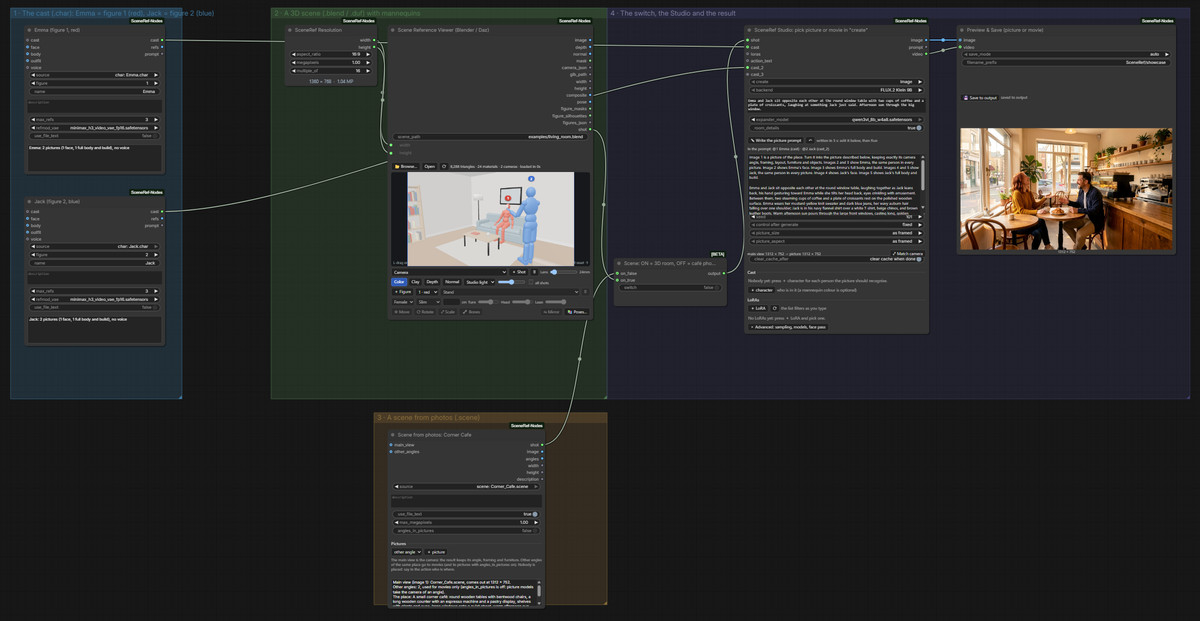
A ComfyUI workflow that uses 3D scenes or several real-world photos as references to set camera positions and character placements, then combines them with your own characters to output FLUX.2 Klein 9B images or MiniMax H3 videos with audio and dialogue.
Upgraded from B to A: Using 3D layouts to control H3 camera positions and placements is the most novel idea this issue, with clear steps and model lists; however, it has many dependencies and lacks video final cut examples.
Images
Reasons for Recommendation
- New model: Directly open Blender .blend or Daz Studio .duf scenes within the nodes, walk through them to place posable mannequins and select cameras; if no 3D scene is available, packaging several location photos into a .scene file also works. This "layout first, then generate" approach is rare among other H3 reference-to-video workflows.
- Characters can use .char files, DaSiWa RefMods, or regular photos, with each person bound to a mannequin color; SceneRef Studio uses a vision model to automatically write prompts and internally constructs the generated image.
- Serves needs for controlling scene layout, camera positions, and multi-person placements in reference-to-video generation (ref2va); the author provides step-by-step operations for each group and all model filenames, and it is free.
How to Use
- First git clone ComfyUI-SceneRef-Nodes into custom_nodes and restart, then import scenerefWorkflow_v10.json; video requires MiniMax H3 ref2va, Qwen3-VL 32B text encoder, H3 video and audio VAEs, and ref2v turbo LoRA. Writing prompts requires a Qwen3-VL 8B (with lm_head) file, which Studio locates automatically by filename.
- Group 1 selects characters, Group 2 uses the built-in example room to select Camera and add mannequins with + Figure, and Group 3 selects photo scenes; a switch determines whether to use the 3D room or photos. In Studio, set create to movie, write actions, click ✎ Write the prompt, check the prompt, then Run. Results are saved to output/SceneRef/.
- Queuing must be done within the ComfyUI web interface; the 3D view is rendered by the browser.
Risks and Limitations
- The card states "the zip contains example characters and cafe scenes," but this version only uploaded a single .json workflow file; whether the example .char / .scene files are in the node repository needs to be confirmed by the user
- High dependency load: custom nodes, FLUX.2 Klein 9B, Qwen3-VL 8B, and the full H3 model suite; the author tested on Windows 11 + 16 GB NVIDIA GPU; .blend files require Blender 4.2+, and .duf files require Daz Studio 4.x
- Visible examples consist of 2 images, with no final video output; additionally, 1 sensitive-level examples are hidden; published less than 1 hours ago, the license does not allow derivatives; this entry has not been run
Worth Watching (3)
[B] MiniMax-H3/Fastvideo FL2VA/REF2VA · 🟢v3.3
Workflow · Version Update · Author DemonAlone · Published 10-30 17:32 · Downloads 31
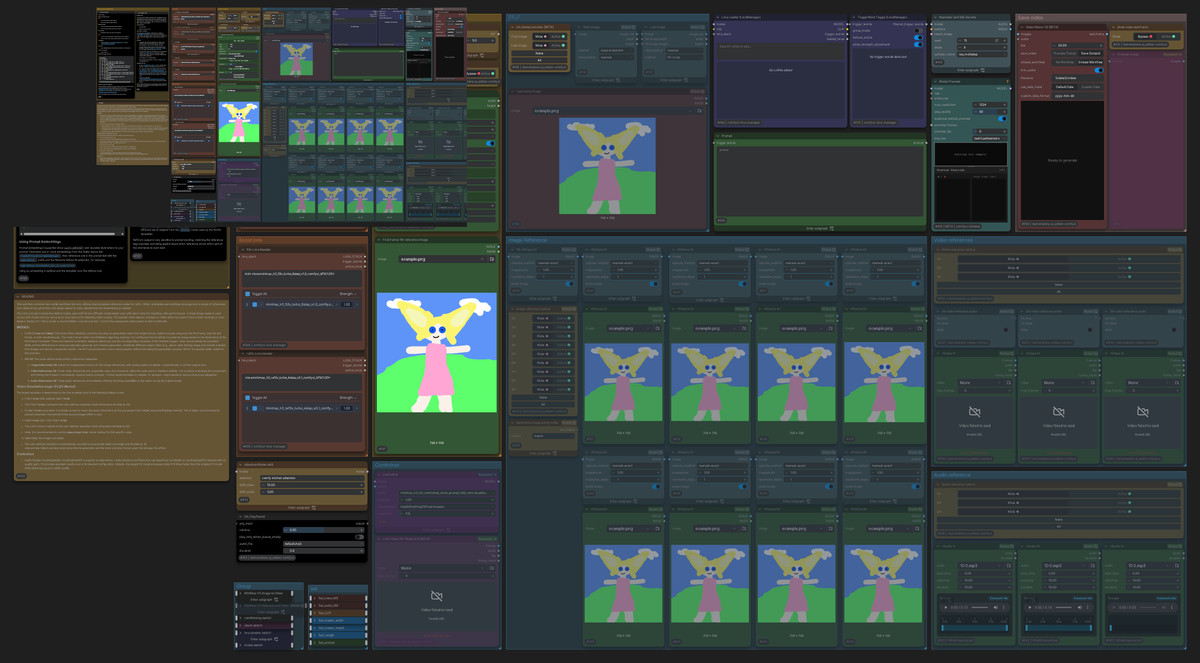
A simple H3 first-and-last-frame (FL2VA) and reference-to-video (REF2V) ComfyUI workflow, including reference controls, plus a version that only does FL2VA + FastVideo; v3.3 is a minor update.
Downgraded from A to B: Changes are minimal (mainly audio preview), the card description is too brief, and it is unclear which models are required.
Images
Reasons to Recommend
- Version update (the 9th version): Added audio latent preview to the Model Preview node and adjusted preview settings, removed an acceleration LoRA and its links, updated the README, and made minor UI adjustments
- For users who want to run first-and-last-frame or reference-to-video with a lightweight workflow and preview audio during generation; free, license allows image output and rental; the entire model has accumulated 1303 downloads (only indicates popularity)
How to Use
- Download minimaxH3Fastvideo_V33.zip and import it into ComfyUI, then add nodes and models according to the README; specific models, steps, and parameters are not provided by the author on the card
Risks and Limitations
- The workflow JSON is not new weights; changes in this version only involve previews and documentation, with generation capabilities essentially the same as the previous version
- The model card has only two sentences of introduction; required nodes and models must be checked in the README inside the zip; only 1 example images; this entry has not been run
[B] Prophetero Audio Fix — Better Sound. Original Picture. · v1.0
Workflow · New Model · Author Prophetero · Published 10-30 18:12 · Downloads 22
A ComfyUI video audio correction tool that only processes the audio track without re-encoding the video: adjusts volume, normalizes loudness, replaces audio tracks, shifts audio forward/backward for alignment, adds fade-in/fade-out, mutes, or exports WAV.
Maintained at B: Clear purpose and complete steps, it is a practical small tool for post-production; however, it is unrelated to H3 generation itself and has no examples.
Images

Reasons to Recommend
- New model: Solves the need to "fix the sound when the visuals are already satisfactory," directly copying the original video stream during full export; the author claims it verifies the SHA-256 of the encoded video, leaving the original file untouched and automatically renaming the output
- Can replace the original audio track with another audio file or the sound from another video segment, and can shift audio forward/backward to align lip-sync; allows listening to the original and processed short previews before saving
- Not tied to H3, works with videos generated by other models like LTX, as well as camera footage; does not require generation models or a GPU; free for commercial creative use
How to Use
- Unzip propheteroAudioFixBetter_v10.zip, run START_HERE.cmd, select the actual ComfyUI backend being used (SwarmUI users should select SwarmUI or its ComfyUI backend), then completely restart ComfyUI / SwarmUI; refreshing the browser alone is not enough
- Open Prophetero_Audio_Fix_GLOBAL.json, select a short video for comparison preview, use Run / Queue Prompt to save the full output; files are located in output/Prophetero/AudioFix/Final
Risks and Limitations
- Not an H3-specific capability, nor a generation model; the installer is provided only for Windows
- The first public version only processes one main video stream and one mono/stereo audio track; extra audio tracks, subtitles, and data streams are not preserved
- No visible examples (1 are hidden), so audio processing effects cannot be previewed; the license prohibits resale or paid packaging; this entry has not been run
- The card image is an AI-generated diagram, not the actual effect of the model; the author has no publicly available general-level examples
[B] Estylized3D [Minimax / MOSS / Krea2 / SD] · Minimax v1.0
LoRA · Port · Author TeraWatt · Published 10-30 10:02 · Downloads 2 · Paid
A style LoRA that transforms the visuals of standard prompts into a stylized 3D rendering texture; this is its MiniMax H3 video version, available for paid download.
Maintained at B: Clear style direction, with video examples and trigger words, but it is paid and lacks any H3-specific parameters.
Images

Reasons to Recommend
- Port: The same model already has MOSS Image, Krea 2, Illustrious, and SDXL versions; the H3 version weights are a separately trained file; the author did not specify differences between the H3 version and the image version
- The author states the purpose is to unify different subjects such as portraits, landscapes, and pets into the same series of 3D rendering styles, maintaining visual consistency across the entire project
- Includes 8 example videos with prompts, allowing users to preview the effect first; the entire model has accumulated 278 downloads (only indicates popularity)
How to Use
- Load Estylized3D2_TeraWatt_Minimax.safetensors in an H3 workflow, and write the trigger word Estylized3D2 in the prompt; strength, steps, and other parameters are not provided by the author
Risks and Limitations
- Paid download (permanent payment), so the weights cannot be verified for this entry
- The description on the card is written for the image version (e.g., "make it look like a real painting gift"), with no usage instructions for video, image-to-video, or first-and-last-frame
- Additionally, 6 sensitive-level examples are hidden
Trigger Word: Estylized3D2
Included Only (2)
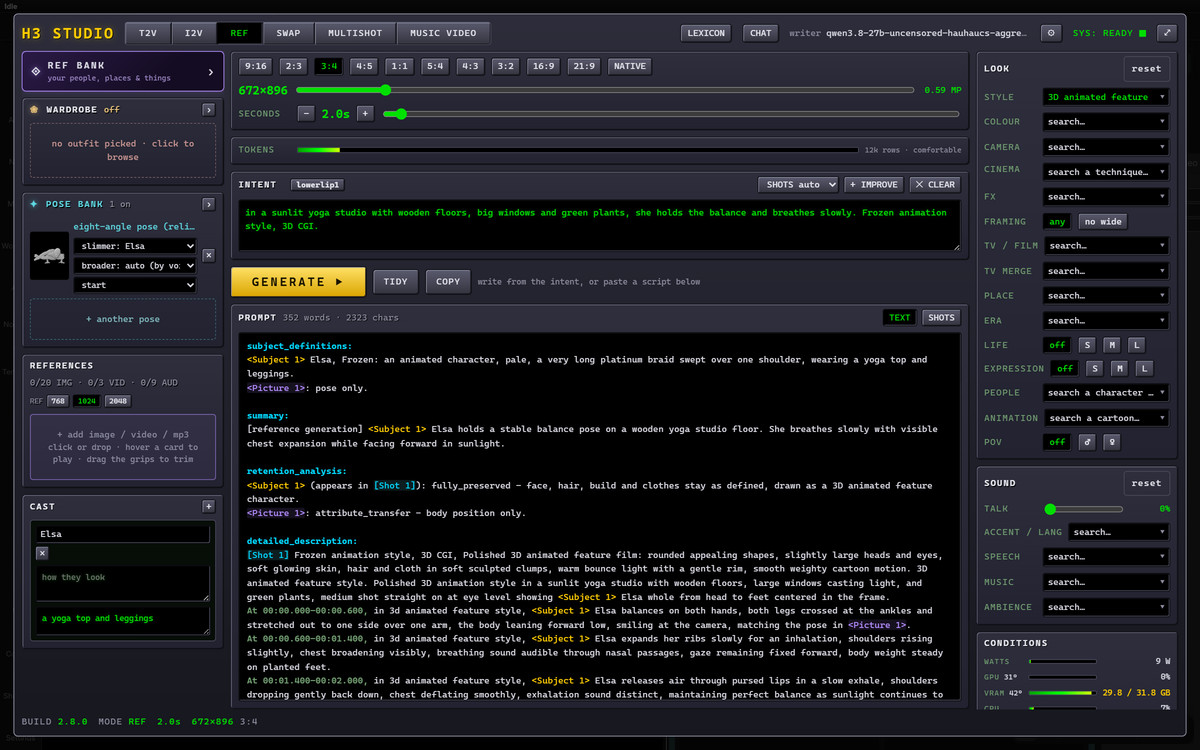
- Lora-Daddy H3 Studio ! Pose swapping, new dials, New multishot/music video tabs! Halloween 25% sale · V2.8 — Workflow: Lora-Daddy's H3 Studio workflow V2.8, the author claims it adds 1000+ swappable poses (customizable), and rebuilds the chat, multishot, and MV tabs; core nodes must be purchased separately.
- Antonia NordhavenLove · MiniMaxH3 — LoRA: Character LoRA for the fictional female character Antonia NordhavenLove, this is its MiniMax H3 video version.

Data: Civitai public API (base model MiniMax H3), inclusion window 10-30 08:31 → 10-30 21:01 (Beijing Time). Recommendation reasons have been reviewed by editors; download counts only indicate popularity.