Zhenzhen's AI Radar · MiniMax H3 Image · 2026-11-11 Evening Report
This issue features 1 new versions: Strongly Recommended 0 · Recommended 1 · Worth Watching 0 · Included Only 0
Editor's Note This issue reviews 1 new versions of H3 Image. Column A: juiceman868's character sheet workflow. Upload a character image, and it automatically renders 8 views (4 full-body, 4 face close-ups) and composes them into a single character sheet. Rendering resolution and collage size are configured separately. The downside is the large model download size and the default suitability only for a single standing character with a face. Another similar workflow, H3 Character Sheet Designer v1.4, targets the H3 base model and is included in the H3 section.
Recommended (1)
[A] H3 Image Character Sheet Builder · v1.0
Workflow · New Model · Author juiceman868 · Published 11-11 17:43 · Downloads 91
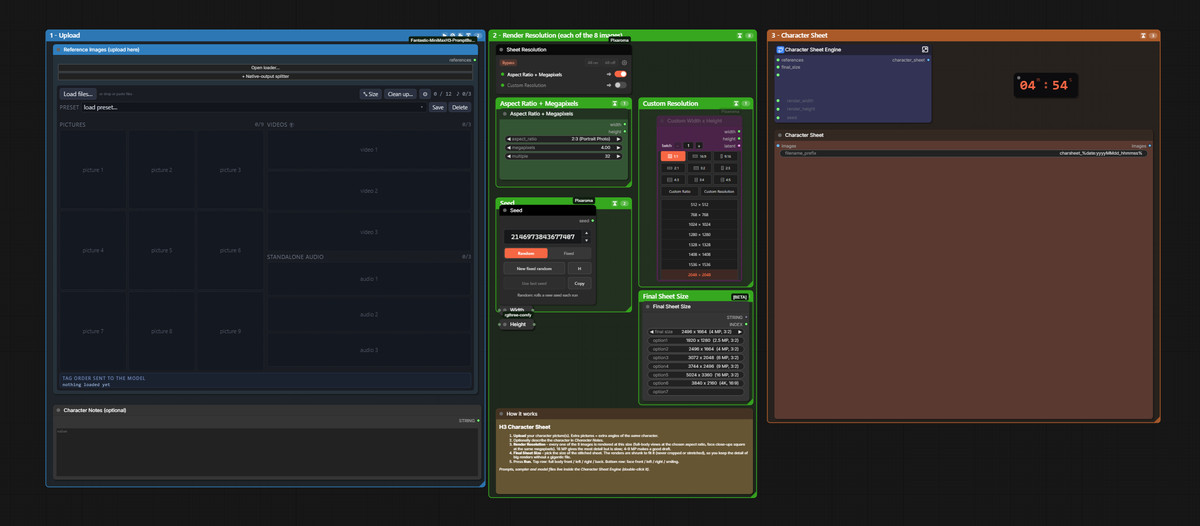
Upload a character image, and with one click, use H3 Image to render 8 view images separately and compose them into a single character sheet: the top row features full-body front, left side, right side, and back views; the bottom row features face front, left side, right side, and smiling views.
The author notes that this references foxydits' H3 Image Pose Studio workflow (included in the H3 Image section of the 11-11 morning report). This version retains only the character sheet function.
Images
Reasons for Recommendation
- New model (workflow); serves character design, storyboard styling, and preparation of multi-view assets before training character LoRAs: each view is rendered separately with prompts tailored to the specific angle, photos remain photos, illustrations remain illustrations, and patterns, hair, clothing, and body proportions remain consistent across the 8 views
- Minimal operation: three panels—Upload, Resolution, and Character Sheet—with no Pose Studio or image comparison; the 8 prompts, sampling settings, and model filenames are all contained within a single Character Sheet Engine node, which can be modified by double-clicking
- Single rendering resolution and final collage size are configured separately: full-body images default to 2:3 portrait, while face close-ups are square images with the same pixel count; the collage has presets ranging from 1920×1280 to 5024×3360, defaulting to 2496×1664, with no cropping or stretching during scaling; 2 visible example images
How to Use
- Requires ComfyUI v0.45.0 or newer (older versions lack the MiniMax H3 Image Conditioning node), as well as the ComfyUI-Pixaroma, rgthree-comfy, and ComfyUI-Fantastic-MiniMaxH3-PromptBuilder node packages (all installable via ComfyUI-Manager)
- Models: place minimax_h3_image_pruned_int8_convrot (approx. 21 GB) in diffusion_models, qwen3vl_32b_minimax_h3_int8_convrot (approx. 27 GB) in text_encoders, and add the H3 Image VAE; upload the character image in Reference Images (multiple images must be different angles of the same character), you can supplement unseen details like back clothing in Character Notes, and change the seed in the Seed box
- First generate a draft at 4 MP, then increase Render Resolution for the final output once satisfied
Risks and Limitations
- Prompts are by default targeted at a single standing character with a face; group shots, quadrupeds, or faceless designs require manual prompt modification
- The author states that on their 5090, running the full set at 4 MP takes approximately 6 minutes, with higher resolutions taking longer; the face close-up prompt specifies a portrait telephoto lens, and the author suggests weakening this phrase when creating 2D flat art styles
- 1 examples are hidden; large model download size
Data: Civitai public API (base model MiniMax H3), inclusion window 11-11 15:33 → 11-11 21:33 (Beijing Time). Recommendation reasons have been reviewed by editors; download counts only reflect attention levels.