Zhenzhen's AI Radar · MiniMax H3 Image · 2026-11-12 Evening Report
This issue features 2 new versions: Strongly Recommended 0 · Recommended 2 · Worth Watching 0 · Included Only 0
Editor's Note This issue reviews 2 new versions of H3 Image, and all 2 are rated A. Top recommendation: Character Sheet Workflow v2.0: Upload a character image, render 8 angles separately, and combine them into a single character sheet. This version adds four character presets, quadruped animal, and vehicle views. If no image is uploaded, it automatically designs one first. Enzino's integrated workflow combines text-to-image, image editing, prompt expansion, and MOSS texture refinement into five modules, also rated A; both require users to prepare approximately tens of GB of H3 Image models on their own.
Recommended (2)
[A] H3 Image Character Sheet Builder · v2.0
Workflow · Version Update · Author juiceman868 · Published 11-12 17:42 · Downloads 55
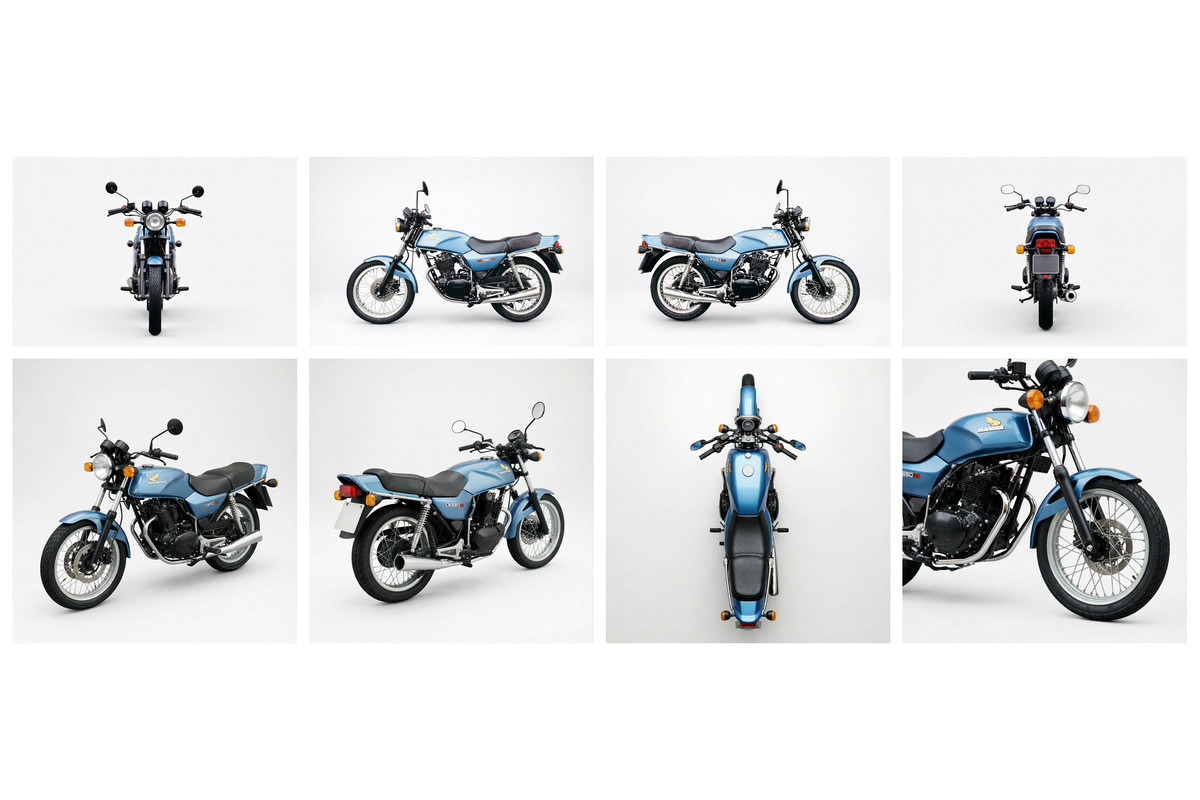
An H3 Image workflow v2.0 that takes one character reference image as input and outputs a complete character sheet: it renders 8 views separately and automatically composes them.
Image
Reasons for Recommendation
- Version update: Added a character type dropdown menu, allowing one-click switching of the 8 view prompts to one of four presets; body views for quadruped animals and vehicles automatically switch to landscape orientation, and the bottom row for vehicles is changed to front three-quarter, rear three-quarter, top-down, and detail close-ups; if no image is uploaded, it first renders a design image to serve as a reference for the 8 views
- Workflow itself: The top row contains 4 full-body views (front, left, right, back), and the bottom row contains 4 face close-ups (front, left, right, smiling). Each view is rendered separately with its own prompt; the author states that photos will retain photographic quality, while illustrations will remain illustrative
- The new logic in this version uses only native ComfyUI nodes, without adding new node packages; 5 visible examples
How to Use
- Upload character images in Reference Images (multiple images should be different angles of the same character). Optionally, write details not visible in the image in Character Notes. Set the Render Resolution, choose the final composition size (default 2496×1664), and click Run
- To modify view prompts, sampling parameters, or model filenames: Double-click the Character Sheet Engine node; to change the seed, use the Seed box
Risks and Limitations
- Dependencies listed by the author: ComfyUI v0.45.0 or higher, and three node packages: ComfyUI-Pixaroma, rgthree-comfy, and ComfyUI-Fantastic-MiniMaxH3-PromptBuilder; models require approximately 21 GB for the main model + 27 GB for the text encoder + 1.2 GB for the VAE
- Prompts assume by default that the reference image is a standing character with a face; face close-ups specify a 100mm portrait lens, so flat 2D characters may require wording adjustments
- The author states that a full run at 4 MP per image takes approximately 6 minutes on their machine; 3 examples are hidden
[A] Enzino H3 Image Workflow · v1.0
Workflow · New Model · Author enzino · Published 11-12 16:24 · Downloads 73
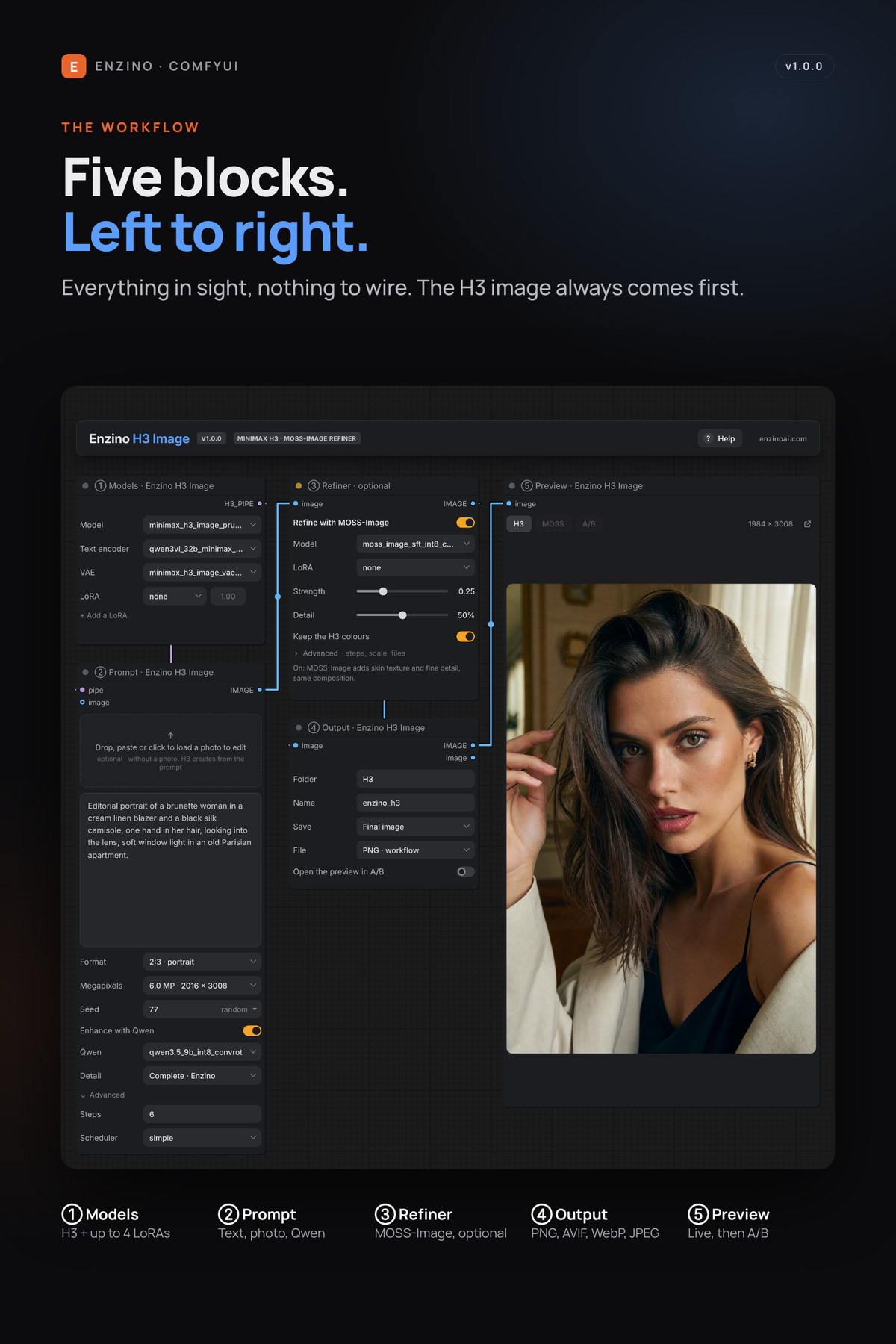
An integrated H3 Image workflow with five unconnected modules: text-to-image / image editing, Qwen prompt expansion, optional MOSS-Image texture refinement, multiple LoRAs, and comparison preview.
Image
Reasons for Recommendation
- New model, serving daily image generation for H3 Image: Write a prompt or drag in a photo and specify what to change; the expander completes a short idea into a full description required by H3 Image (composition, face, skin, clothing, scene, lighting), with three levels
- Optional MOSS-Image refinement performs a lightweight secondary sampling to enhance skin texture and details without changing the composition, with an option to preserve H3 original colors; up to 4 LoRAs can be attached to H3, each with its own strength setting
- The preview includes an A/B comparison bar between H3 and MOSS, with a maximum output of 20 MP, supporting PNG / AVIF / WebP / JPEG formats; 4 visible examples
How to Use
- Place the ComfyUI-Enzino-H3-Image folder into ComfyUI/custom_nodes/ and restart, then drag enzino_h3_image.json onto the canvas; requires ComfyUI 0.45 or higher
- Maintain 6 steps / simple (the author states H3 Image is distilled according to this grid); refinement strength 0.15–0.25, Detail 40–60%; when attaching an acceleration LoRA, the refinement module automatically changes CFG to 1
Risks and Limitations
- Requires users to provide H3 Image models, text encoders, and VAE (the author states approximately 50 GB); the expander additionally requires Qwen 3.5 9B, and refinement additionally requires MOSS-Image
- Includes the author's own node package; the complete guide is in the zip file, with limited instructions on the page
- The model card begins with a promotion for the author's paid membership; 1 examples are hidden
Data: Civitai public API (base model MiniMax H3), inclusion window 11-12 09:03 → 11-12 21:01 (Beijing Time). Recommendation reasons have been reviewed by editors; download counts only reflect attention levels.