Zhenzhen's AI Radar · MiniMax H3 Image · 2026-11-14 Evening Report
This issue features 4 new versions: Strongly Recommended 1 · Recommended 2 · Worth Watching 1 · Listed Only 0
Editor's Note This issue reviews 4 new versions of H3 Image, with 1 rated S, 2 rated A, and 1 rated B. The top recommendation is the Character Sheet Workflow v4.0: upload a single character image to generate a full multi-view character sheet. This version allows you to select any combination from 11 views, automatically arranges the layout based on the selected views, and introduces an
art_styleparameter to unify the artistic style across the entire image. Two art style LoRAs by KaleidRuby—Ningenmame and Onineko—have been ported from MOSS with complete parameters, rated A. The one-click installer package includes a workflow for visual prompt expansion with comprehensive documentation, but requires downloading approximately 40 GB and running an installation script, rated B. There are no reposts or entries with identical hashes to exclude in this issue.
Strongly Recommended (1)
[S] H3 Image Character Sheet Builder · v4.0
Workflow · Version Update · Author juiceman868 · Published 11-14 19:04 · Downloads 43
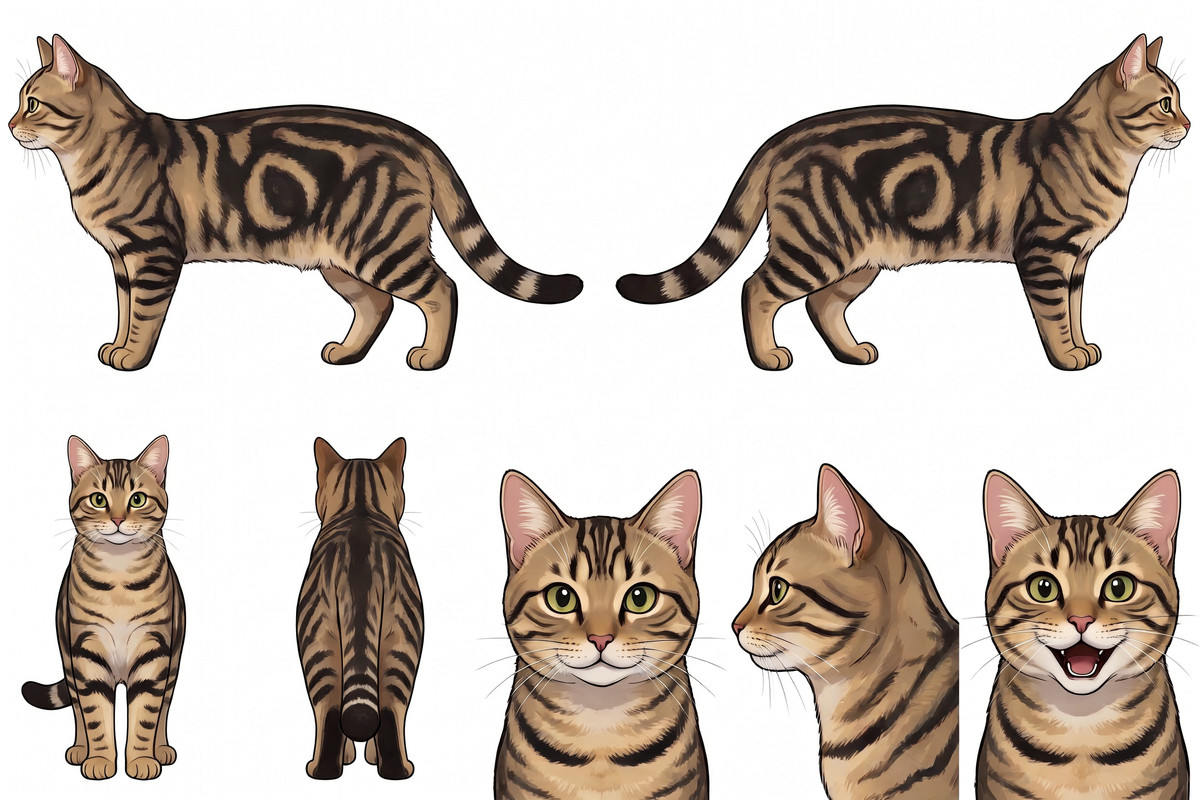
H3 Image Character Sheet Workflow v4.0: Upload a character image (or upload nothing) to render multiple views of the same character in one go; this version allows you to select view combinations and introduces an art_style parameter to unify the artistic style across the entire image.
Images
Reasons for Recommendation
- Version Update: When
default_layoutis disabled, you can select from 11 views—front, back, left/right side profiles, 3/4 front/back full body, as well as close-ups of the front, 3/4, left, right, and smiling faces; a new head close-up at a 45° turn is added for 3/4. - The layout is automatically generated based on the selected views, with different arrangements for characters, quadrupeds, and vehicles;
fit_shape_to_viewsis enabled by default, so the canvas shape adjusts when fewer views are selected to avoid blank strips; selecting only one view outputs a single image directly. - New
art_styleoptions (Match reference / Photorealistic / Anime / Cartoon / 3D): The author states this addresses feedback about "anime bodies with realistic heads when using photo references." Once selected, the entire image, including the head, adopts the chosen style; reference images only provide facial features, hairstyle, clothing, and color scheme. - The author notes that most changes stem from comments and direct messages; the model has already received 1221 downloads and 5 comments, with 5 visible examples in this version.
How to Use
- Three steps from left to right: Step 1 Upload reference image → Step 2 Select
character_type,art_style, and view toggles in the Settings panel → Step 3 Run to generate images; if no image is uploaded, a new character is generated based on notes or random settings. - Requires the latest ComfyUI (the author states older versions lack the MiniMax H3 Image Conditioning node), custom nodes ComfyUI-Pixaroma and ComfyUI-Fantastic-MiniMaxH3-PromptBuilder (both installable via ComfyUI-Manager), as well as the H3 Image int8 main model, Qwen3-VL 32B text encoder, and H3 Image VAE.
Risks and Limitations
- The author states they could not reproduce the issue where "realistic images look like paintings," so the Photorealistic option is a preventive measure rather than a verified fix.
- The main model is approximately 21 GB and the text encoder is approximately 27 GB; the author's generation time data comes from an RTX 5090; this is a workflow only and does not include new weights.
- 1 sensitive-level examples are hidden; if blank strips appear on the sides, the author suggests simply re-running the process.
Recommended (2)
[A] [MOSS|H3 image] ningenmame (にんげんまめ) style · H3 image v1.0
LoRA · Ported · Author KaleidRuby · Published 11-14 12:21 · Downloads 48
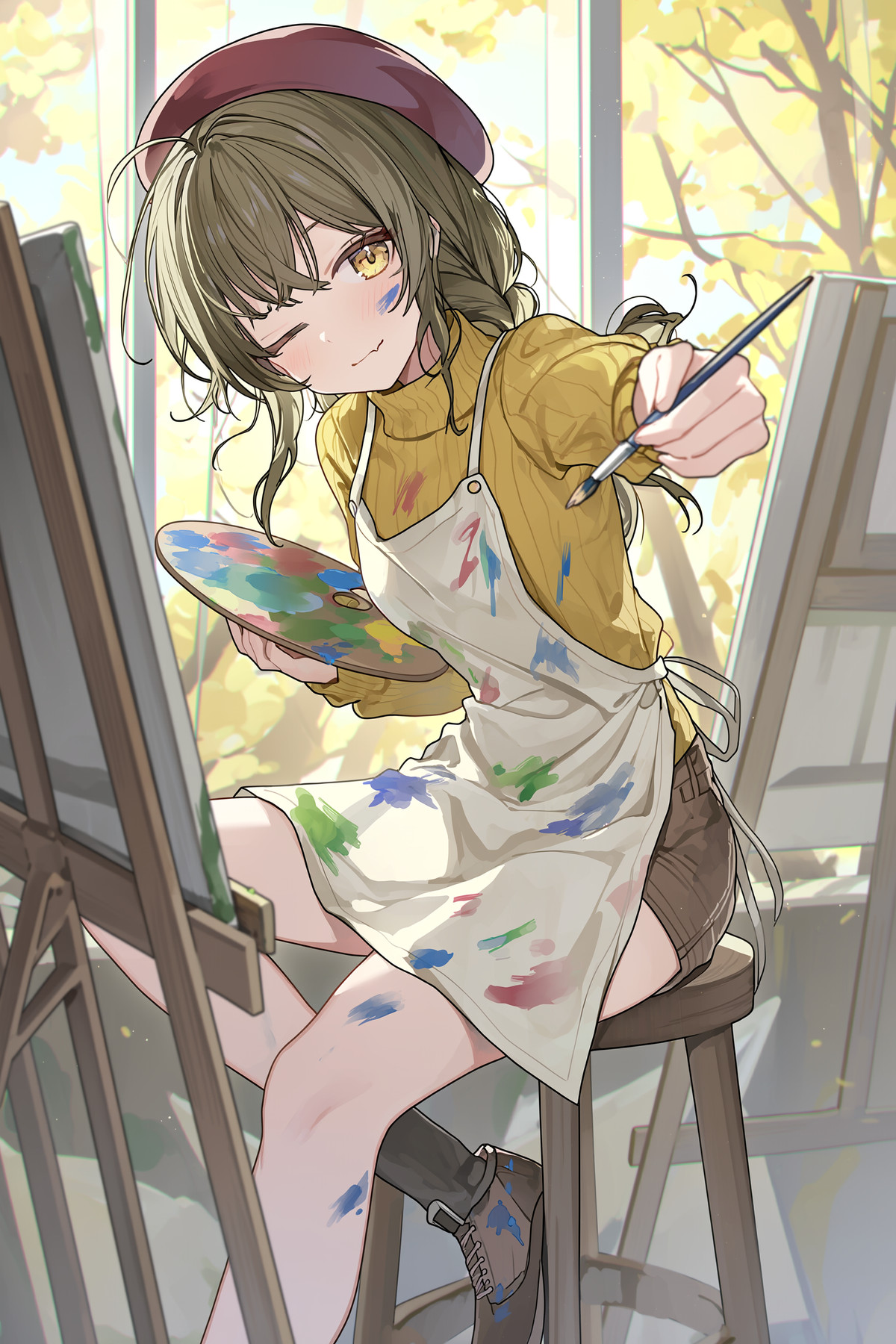
An art style LoRA based on the late-period illustration style of Japanese artist Ningenmame, for H3 Image (specifically for H3 Image generation, not H3 Video).
Images
Reasons for Recommendation
- Ported: Originally available for MOSS Image (usable with both SFT and Base, strength 0.8-1.5); the H3 Image version provides separate recommended settings.
- The author notes that training used only the artist's late-period works; early works were not included.
- Art style transfer for anime illustration; 6 visible examples.
How to Use
- Add
@ningen_mameto the prompt; 16MP, cfg=1, step=6, strength 0.8-1.2.
Risks and Limitations
- Author's warning: If the total strength exceeds 2.0 when stacking with other LoRAs, image quality may degrade; increasing steps from 6 to 12 can mitigate this.
- The author did not provide version notes; 2 sensitive-level examples are hidden; as an artist style LoRA, please assess commercial use suitability yourself.
Trigger Words: @ningen_mame
[A] [MOSS|H3 image] onineko (おにねこ) style · H3 image v0.8
LoRA · Ported · Author KaleidRuby · Published 11-14 13:06 · Downloads 34
The H3 Image version (v0.8) of the art style LoRA by Japanese artist Onineko, for use with H3 Image generation, not H3 Video.
Images

Reasons for Recommendation
- Ported: Originally available for MOSS, trained on Base and usable with SFT (SFT requires higher strength; MOSS version settings were 0.6-1.0, cfg=3, steps=50); the H3 Image version provides separate recommended settings.
- Released simultaneously with the same author's Ningenmame LoRA, with identical settings; 7 visible examples.
How to Use
- Add
oninekoto the prompt; 16MP, cfg=1, step=6, strength 0.8-1.2.
Risks and Limitations
- Version number v0.8; the author did not provide version notes; if total LoRA strength exceeds 2.0 when stacking, image quality may degrade, which can be mitigated by increasing steps to 12.
- 2 sensitive-level examples are hidden; as an artist style LoRA, please assess commercial use suitability yourself.
Trigger Words: onineko
Worth Watching (1)
[B] H3 Image with uncensored vision (installer + workflow) · v1.0
Workflow · New Model · Author Torque · Published 11-14 18:56 · Downloads 35
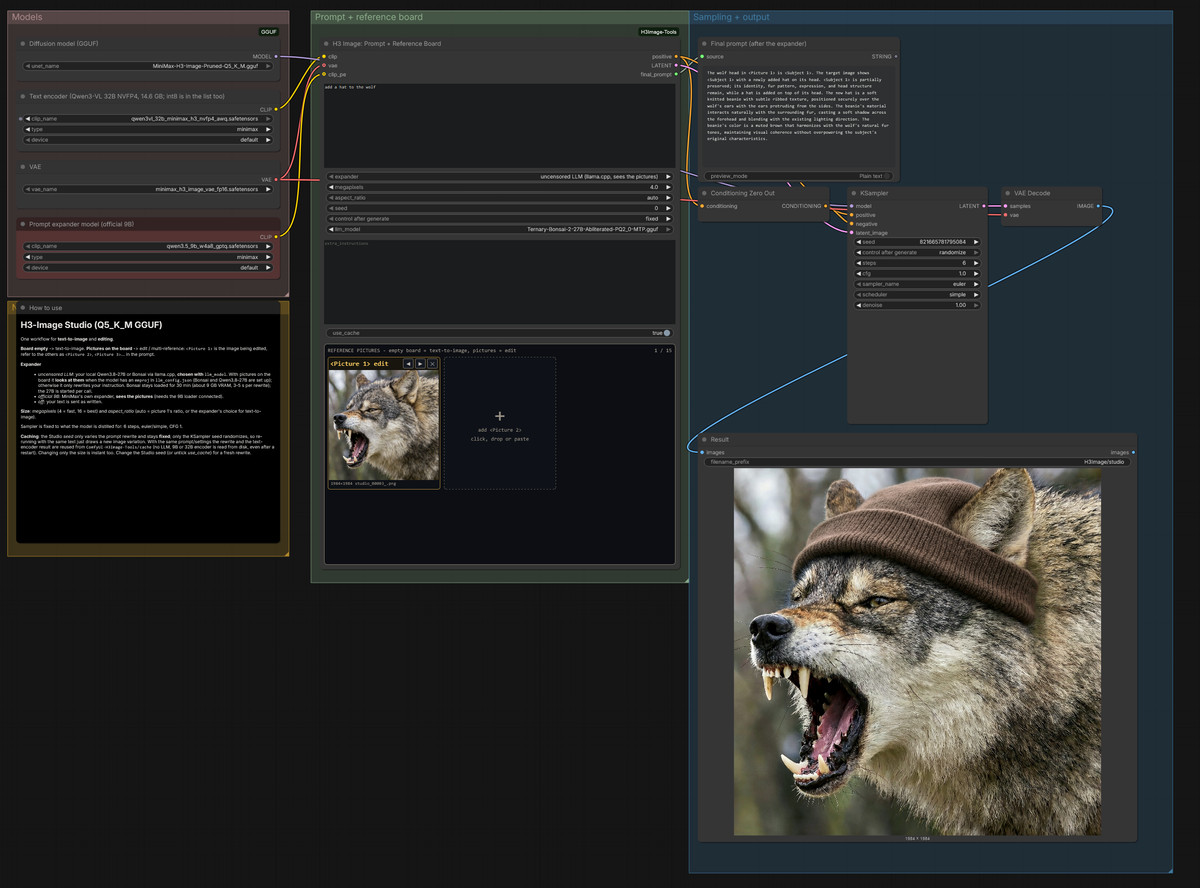
H3 Image one-click installer package plus workflow: Automatically installs ComfyUI Portable, selects GGUF quantization based on VRAM, and includes a prompt expander that can view reference images; text-to-image generation and editing with up to 15 reference images share a single workflow.
Images
Reasons for Recommendation
- New Workflow: The reference image panel allows clicking, dragging, or pasting up to 15 images, automatically labeled as
<Picture N>; the expander can use the official 9B model or the optional Bonsai 27B (approx. 7.7 GB), which analyzes images before writing prompts when images are present. - The installer itself is approx. 50 KB and does not include models; it downloads fixed versions of ComfyUI v0.45.0, ComfyUI-GGUF, and models from Hugging Face from original sources; for VRAM above 24 GB, select Q5_K_M; for RTX 50 series, use NVFP4 text encoder; otherwise use int8.
- Caching: The same prompt, image, and seed will not reload the text model; the prompt seed is fixed while the sampling seed is random, allowing variations on the same description.
How to Use
- After unzipping, run
Install_H3Image.bat, read the license, and type YES; then runH3Image\Start_H3Image.batand press W to open the workflow browser and loadH3Image_Studio. - Leave the reference image panel empty for text-to-image generation; add images for editing; the author did not specify sampling steps or cfg values.
Risks and Limitations
- Requires running the author's installation script locally (the author states it was vibe coded); download size is approx. 40 GB (approx. 49 GB including Bonsai), requiring approx. 56 GB of free disk space.
- The author has only tested on a machine with RTX 5090 32 GB VRAM and 64 GB RAM; "uncensored vision" in the title refers to the optional Bonsai expansion model.
- Released just 2 hours ago, with only 2 example images and 0 likes.
Data: Civitai Public API (base model MiniMax H3), inclusion window 11-14 08:48 → 11-14 21:01 (Beijing Time). Recommendation reasons have been reviewed by editors; download counts reflect attention only.