Zhenzhen's AI Radar · Qwen Image 2.1 · 2026-11-18 Morning Briefing
This issue features 3 new versions: Strongly Recommended 0 · Recommended 1 · Worth Watching 0 · Listed Only 2
Editor's Note This issue reviews 3 new versions of Qwen 2.1, with 1 rated A and 2 rated C. The top pick is the Minecraft armor texture LoRA: it directly generates tiled armor UV maps, using zone coordinates in the prompt to separately describe the helmet, chestplate, leggings, and boots; the author also clearly documents the post-processing steps for pixel alignment after image generation. The refusal-free version of the Qwen3.5-9B text model (INT8 / W4A8) is merely a quantized conversion of a third-party model, intended to replace prompt expansion models to bypass refusals; both versions are rated C.
Recommended (1)
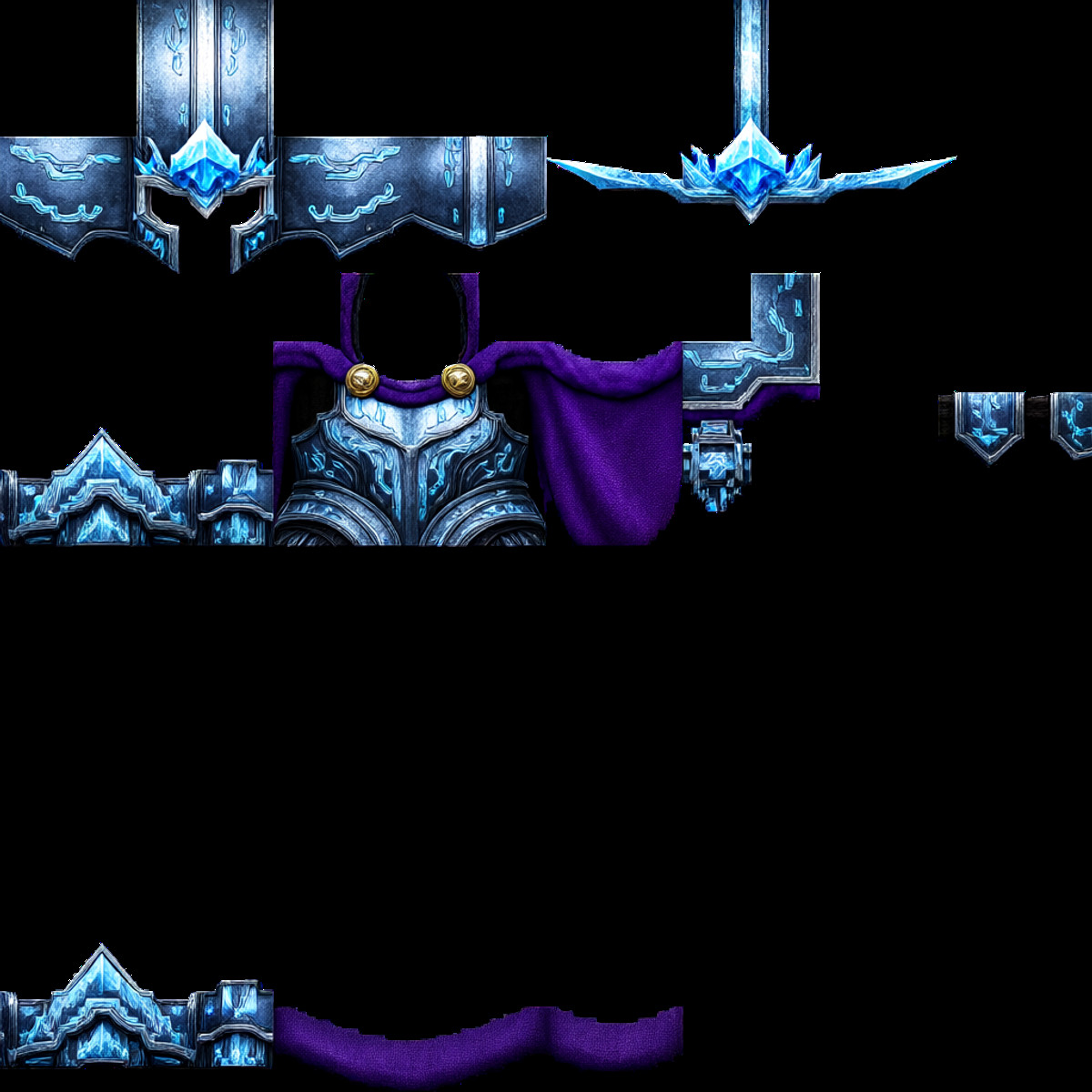
[A] Minecraft Armor Creator Qwen2.1 · v4.0
LoRA · New Model · Author Zarj · Published 11-18 00:34 · Downloads 16
A LoRA for generating tiled UV textures of Minecraft armor sets: it maintains the blocky style, can render metal, fabric, and leather materials, and allows separate control over the helmet, chestplate, arms, leggings, and boots via texture zones.
Images
Reasons for Recommendation
- New capability: The model understands spatial zones within the texture; writing normalized coordinates for a specific zone plus a description in the prompt modifies only that section.
- Serves players and mod authors creating Minecraft resource packs and armor skins, as the output is a texture layout rather than a rendered preview.
- Trigger words, coordinates for each zone, and mandatory post-processing steps are all documented; 2 example images are visible, it is free, and the license permits commercial use.
How to Use
- Include the trigger word [minecraft_armor_texture] in the prompt.
- Write by zone, for example: Chestplate zone [250, 250, 625, 500]: followed by a description of that section; there are coordinate sets for the helmet, helmet effects, boots, arms, leggings fabric, and leggings armor (see model card).
- Post-generation manual processing is required: use levels to convert semi-transparent pixels to fully transparent or opaque, resize to the target resolution using nearest-neighbor interpolation, and manually align the pixel grid.
- The author did not specify strength or step counts.
Risks and Limitations
- The author explicitly states that the generated grids are not pixel-perfect; without post-processing, they cannot be used in-game.
- 4 sensitive-level examples are hidden; only 2 visible examples are provided.
Trigger Word: [minecraft_armor_texture]
Listed Only (2)
- Qwen3.5-9B-Heretic2.1 (Abliterated TE&PE for Moss Image, Qwen Image 2.1, Minimax H3 Image) · INT8 — Text Encoder: A text model converting the third-party refusal-free version of Qwen3.5-9B (Heretic 2.1) to INT8 ConvRot format: usable as a text encoder for MOSS Image, or as a prompt expansion model for Qwen Image 2.1 and MiniMax H3 Image.

- Qwen3.5-9B-Heretic2.1 (Abliterated TE&PE for Moss Image, Qwen Image 2.1, Minimax H3 Image) · W4A8 — Text Encoder: The W4A8 ConvRot quantized version of the same refusal-free Qwen3.5-9B text model, smaller than the INT8 version, with identical uses: as a text encoder for MOSS Image or a prompt expansion model for Qwen Image 2.1 / H3 Image.
Data: Civitai public API (base model Qwen 2.1), inclusion window 11-17 20:31 → 11-18 09:01 (Beijing Time). Recommendations have been reviewed by editors; download counts reflect attention only.