Zhenzhen's AI Radar · Qwen Image 2.1 · 2026-11-21 Evening Report
This issue features 1 new versions: Strongly Recommended 0 · Recommended 1 · Worth Watching 0 · Included Only 0
Editor's Note This issue reviewed 2 new versions of Qwen 2.1, with 1 rated A and 1 excluded. The top recommendation is Framotive: it allows you to first converse with an LLM in ComfyUI to define prompts, assign roles such as face/clothing/pose to reference images, and then use Qwen Image 2.1 for generation or editing; it also supports manually writing prompts without connecting to an LLM. It requires installing the node package included in the archive, and its license does not permit commercial use, so it was downgraded from automatic S to A. The weights of the YUL Xiaowu LoRA have the same hash as the YUL-GirlGroup-lora already included in the previous issue, so it is excluded.
Recommended (1)
[A] Framotive for Qwen Image 2.1 · v1.0
Workflow · New Model · Author BeastModeOn · Published 11-21 14:27 · Downloads 33
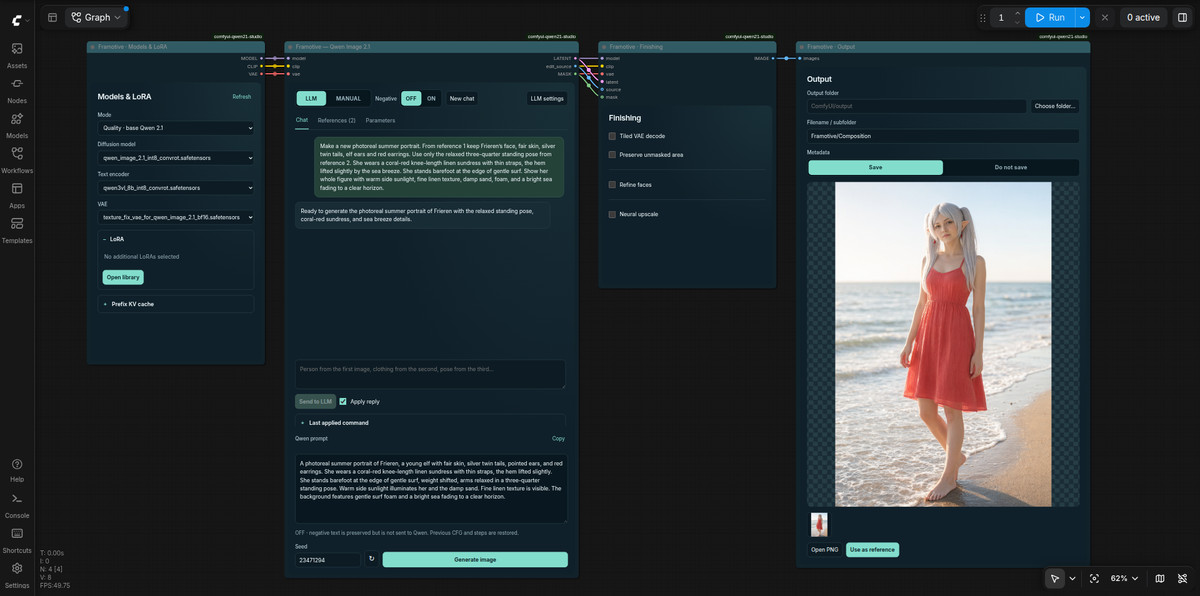
A workflow that integrates LLM conversation, reference image editing, and Qwen Image 2.1 output into a single ComfyUI interface: first discuss composition with the assistant, assign purposes to each reference image, and generate only after confirming the prompt.
(Downgraded to A by editor: depends on bundled node packages and external LLMs; license does not permit commercial use.)
Images
Reasons for Recommendation
- New tool: Four panels (Model & LoRA, LLM/Manual, Post-processing, Output) plus a large preview area; chat and image generation are separated, allowing you to repeat image generation using confirmed prompts without requesting the LLM again.
- Reference images can be individually assigned as face, hairstyle, body type, clothing, pose, art style, composition, background, or original canvas, with notes and sorting supported; supports masked inpainting, outpainting, transparent background PNGs, and optional Union ControlNet.
- The assistant can connect to OpenRouter cloud models, or local LM Studio / Ollama; there is also a MANUAL mode for completely hand-written positive and negative prompts.
- 1 videos + 3 example images are visible, free, with 33 downloads within 7 hours of publication.
How to Use
- Unzip Framotive_Qwen21.zip: contains the workflow, custom node package, README, and Windows/Linux installation instructions; model weights must be downloaded separately.
- In Parameters, first select the task (new image, edit, text layout, transparent image, inpainting/outpainting, reference transfer, etc.), then converse or write prompts manually.
- Author's tip: Negative prompts do not take effect when CFG is 1; using negative prompts with CFG 1.1 under Turbo LoRA is an experimental setting.
Risks and Limitations
- Requires installing the custom node package included in the archive; optional branches (ControlNet, upscaling, face refinement, GGUF, etc.) each require separate weights and dependencies; this tool was not run by the editor.
- License does not permit commercial use; connecting to cloud LLMs requires your own API key; the models and costs recommended by the author are as stated by the author; additionally, 3 sensitive-level examples have been hidden.
Data: Civitai public API (base model Qwen 2.1), inclusion window 11-21 08:31 → 11-21 21:01 (Beijing Time). Recommendation reasons have been reviewed by editors; download counts only reflect attention levels.