Zhenzhen's AI Radar · MiniMax H3 · 2026-11-10 Morning Report
This issue features 7 new versions: Strongly Recommended 1 · Recommended 1 · Worth Watching 4 · Listed Only 1
Editor's Note This issue reviews 7 new H3 versions: 1 S-tier, 1 A-tier, 4 B-tier, and 1 C-tier. Top pick: H3MD Director 0.4.3, which adds a "seamless long video" mode that renders consecutive shots together on a single timeline and allows redrawing just a few seconds of the final video. The A-tier entry is a portrait makeup aesthetics LoRA with the trigger word MdrnBty, which had the fastest downloads this issue but only a few lines of documentation. The AMD-specific Studio, the lip-sync workflow Nova.2, the Tap to Screen memory patch, and the bubble water ripple style LoRA are listed as B-tier (no visible generation examples, verified on only one hardware configuration, or missing parameters); the alien character LoRA, which has only a character backstory and no usage instructions, was downgraded from B to C.
Strongly Recommended (1)
[S] H3MD Director 0.4 – seamless 2–3 min long videos with MiniMax H3 (CCW + simple workflow) · v0.4.3 CCW
Workflow · Version Update · Author 1113800942188 · Published 11-10 05:04 · Downloads 45
Version 0.4.3 of H3MD Director, the H3 long video ComfyUI node package: It adds "seamless long video" (CCW, Chained Context Window), which renders consecutive shots together on a single timeline, producing multi-shot MVs or long takes of 2–3 minutes in a single run.
Ideal for full-song-length MVs: Run the entire sequence first, then use Redraw to fix only the problematic few seconds without having to restart the whole process.
Images

Reasons for Recommendation
- Version update (the previous version of this page was 0.3.x segment-by-segment mode): Check Seamless long video in Director to render consecutive shots together on a single timeline; the author states there are no segment seams and no drift between segments, while hard cuts remain clean hard cuts; unchecking it reverts to 0.3.x segment-by-segment mode
- The author explains the difference from ComfyUI's built-in Context Windows: the built-in method averages the overlapping regions of windows, causing ghosting when there are significant visual changes; CCW runs windows in chronological order, with each window directly taking over the overlapping part from the previous window without averaging
- Added H3MD Redraw / Preview node: allows generating low-resolution previews only, or redrawing just a few seconds of the final video (e.g., 1:12-1:15); before redrawing, you can modify the prompt or reference image for that shot, while frames outside the range remain unchanged frame-by-frame; when interpolating frames to 48 / 60 fps, it no longer mixes shots on either side of a hard cut
- The author provided single-machine data (RTX 5090 32 GB, 64 GB RAM): a 2-minute 20-second MV with 1920×1088 resolution, 10 shots divided into 3 groups, at 48 fps, took 2 hours 18 minutes, with a peak VRAM usage of 11.1 GB, approximately 25% slower than segment-by-segment rendering; redrawing the last 18.6-second shot took 25 minutes 51 seconds
- Changes to 0.4.3 itself include a lighter Control Panel: each LoRA dropdown loads the full list only when expanded; 2 sample videos are attached, and the entire model page had 330 downloads (indicating attention only)
How to Use
- Seamless mode requires ComfyUI 0.44 or newer (older versions will show a clear prompt). Install via ComfyUI Manager by searching for H3MD Director, or clone the GitHub repository into custom_nodes, then drag H3MD Director simple.json from the archive into the canvas.
- In the Director panel, set the duration, prompt, reference image, and locked audio for each shot individually. Check "Seamless long video" and run. To modify a specific segment, enter the time range in the Redraw / Preview node to redraw it separately.
- The author's test configuration: int8 mixed base model, 32B int8 text encoder, 4 step Turbo LoRA, two-stage sampling with 6 steps at low resolution + 3 steps at high resolution. The example workflow uses 8 bit frame caching, requiring about 9 GB per minute at 1080p (originally about 18 GB).
Risks and Limitations
- The author states a minimum VRAM requirement of 16 GB and recommends 24 GB or more. It has currently only been tested on RTX 5090. The entire model set is about 55 GB, plus space for frame caching.
- Seamless mode is about 25% slower than segment-by-segment rendering. "No seams, no drift" is the author's claim; this entry has not been run.
- The node code is AGPL-3.0, and H3 weights have a separate license. The RunningHub link on the page is a promotional link with an invitation code, and the cloud application is still the old segment-by-segment version.
Recommended (1)
[A] Modern Beauty - MMH3 · MiniMax H3 - v3
LoRA · New Model · Author DuckyDuo · Published 11-10 02:36 · Downloads 227
Portrait makeup / aesthetics LoRA: The author claims it adjusts H3's default makeup and facial aesthetics to a more "modern" standard. Trigger word: MdrnBty.
Images

Reasons for Recommendation
- New model (version name v3); serves text-to-video / image-to-video for portrait close-ups. Use it to make makeup and overall aesthetics closer to current trends.
- The author claims v3 has 80% more training data and 80% more training steps than v2; v2 used a larger dataset and a better tagging model.
- Usage instructions provide the trigger word and strength limit; 1 video + 1 image examples are visible.
- Published 6 hours ago with 227 downloads and 15 likes, making it the most downloaded version this issue (indicating attention only).
How to Use
- Add MdrnBty to the prompt, with strength below 1.0 (the author claims < 1.0 is optimal). The author did not provide steps, sampler, or accompanying model details.
Risks and Limitations
- The description is only a few lines and does not specify whether "modern makeup" changes the makeup surface, skin texture, or face shape; you need to judge based on the examples.
- This model page only has this version. The v1 / v2 mentioned in the description are not on this page, so no before-and-after comparison is possible.
- Only 2 visible examples are available; another 2 sensitive-level examples are hidden. The license does not allow publishing derivative models, and commercial use is only allowed via on-site rental.
Trigger Word: MdrnBty
Worth Watching (4)
[B] MiniMax H3 — Studio AMD | EN / FR | ComfyUI · v1.1.3 — Community
Workflow · New Model · Author sylluck1207 · Published 11-10 00:07 · Downloads 22
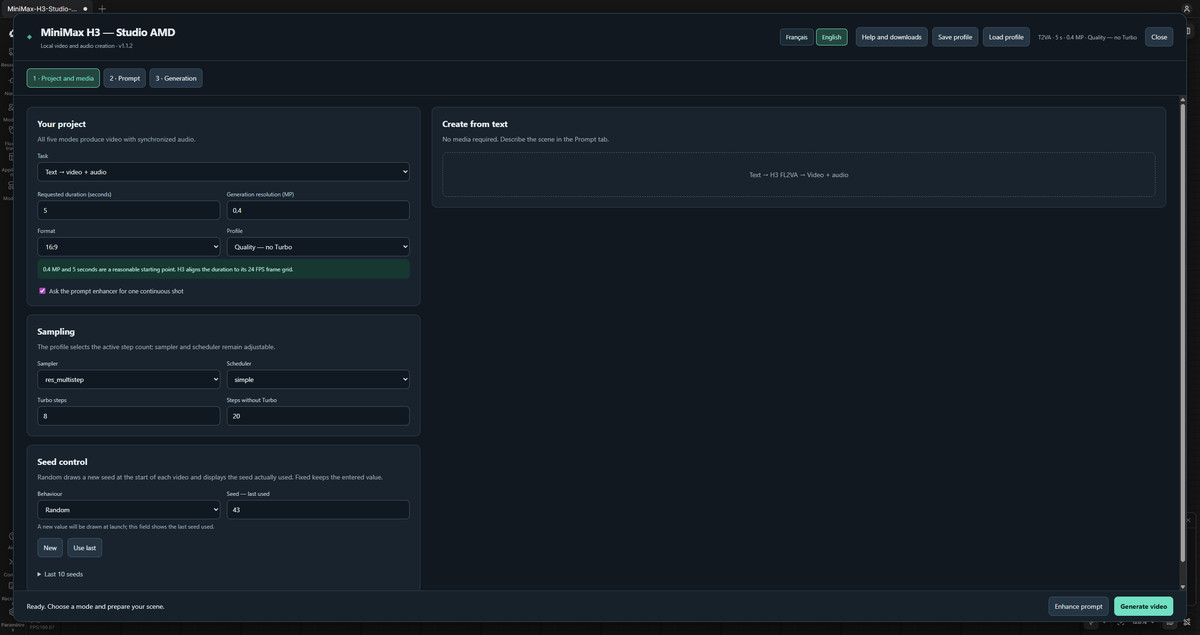
An integrated H3 ComfyUI interface for AMD GPUs (English / French bilingual): Switch between five generation modes (T2VA / I2VA / FL2VA / L2VA / Ref2VA) in a three-step Studio panel, with built-in model download guidance.
Images
Reasons for Recommendation
- New model; serves users running H3 locally on AMD GPUs (ROCm). Text-to-video, image-to-first-frame, first-last frame transition, last-frame guidance, and image/video/audio reference generation share one interface.
- Features: Optionally use Ollama or local ComfyUI models to rewrite prompts according to H3 prompt format; rewritten results can be manually edited. Personal LoRAs, optional Turbo, adjustable steps / sampler / scheduler. Entire Studio configuration can be saved.
- Export uses AMD AMF encoding for MP4 (software H.264 as fallback). Optional image ×2 or H3 latent space ×2 upscaling (supersampling). Models are automatically unloaded and cache cleared after each task. Built-in bilingual help lists model download links, storage folders, and missing files.
How to Use
- Download the complete Community ZIP (the standalone workflow JSON is insufficient). Place the included extensions in custom_nodes, place weights according to the README and model download guide, restart ComfyUI, then load the workflow and open Studio.
- You must configure a working AMD PyTorch environment yourself. This package does not install drivers or PyTorch, nor does it include model weights. The author did not provide recommended steps and sampling parameters.
Risks and Limitations
- The author verified only on one configuration: ComfyUI 0.43.2, Windows ROCm, RX 7900 XTX 24 GB, 64 GB RAM. Other configurations require self-verification. The NVIDIA version is not yet available.
- All 4 examples are interface screenshots; there are no generation result examples. Another 1 sensitive-level examples are hidden.
- The author self-identifies as a beginner, and the workflow was developed with AI assistance. It depends on built-in extensions (GPL-3.0). This entry has not been run.
[B] MiniMaxH3 Lipsync / TLF2VA · Nova.2
Workflow · Version Update · Author Rvage · Published 11-10 00:39 · Downloads 39
The Nova.2 version of the H3 integrated ComfyUI workflow MMH3_Unified: Use a character image to create lip-sync performance videos for existing songs or dialogue, or use native H3 to generate videos with sound from text / images. Renders by scene segments, supports resuming, and can restart from a specific segment.
Images

Reasons for Recommendation
- Version update: Added Prompt Review, which displays the opening and subsequent scene prompts together, allowing you to pause, modify in place, and continue the same run. Added Part Prompt Editor, which allows modifying the prompt for a specific segment in a saved run, taking effect on Resume.
- Optional reference video analysis identifies shot cuts and describes actions in between, automatically writing scene prompts. You can also manually fill in all time points and prompts. Optional YuE2 / MiniMax Music 3 background music, lyric extraction, and dynamic subtitles are also available.
- Complete archiving mechanism: Resume continues unfinished runs, Restart part redoes everything after a specified segment, Load reuses saved runs for subtitles or re-exporting without resampling.
How to Use
- First, update the three Nova node packages: Eclipse Nova 1.0.31, SmartLLM Nova 1.1.13, and Smart Model Loader Nova 1.0.11; in START HERE, select Lip-sync or Native H3, and choose the corresponding presets in the model loader and LoRA presets (switching paths does not automatically change presets)
- Keep the canvas at 24 FPS; the author's lip-sync example uses Euler / beta, CFG 1, 8 steps, and enables Turbo LoRA (strength 1); for the first test, it is recommended to clip a short audio segment, turn off background music and subtitles, generate only one segment per queue, and enable Disk + Keep in output to facilitate resuming
Risks and Limitations
- No visible examples (1 sensitive-level examples are hidden), so the effect cannot be previewed
- Depends on three Nova node packages and multiple optional node packages, resulting in a long model list; the workflow may open with the model selections used during the author's testing, requiring item-by-item verification
- The license does not allow commercial use or the publication of derivative works; analysis instructions are divided into two sets: Standard / Sensitive Content
- The card images are AI-generated schematic diagrams, not the actual results of the model; the author has no publicly available general-level examples
【B】Tap to Screen — MiniMax H3 lip-sync MV on your own song (1–4 scenes, timeline) · v1.3.1
Workflow · Version Update · Author koyan0418439 · Published 11-10 06:08 · Downloads 13
A ComfyUI workflow for creating an H3 lip-sync MV using your own song and a few images: play back on the timeline while pressing keys to switch shots and mark singing intervals, with the corresponding segment of the song for each scene used directly as the audio input for H3.
Images

Reasons for Recommendation
- Version update (v1.3.1, memory maintenance patch, author states the final video creation method remains unchanged): Latents for completed scenes are no longer kept in the ComfyUI cache but are saved as .latent.pt files next to the frame files, and are only read back when a redo is needed; previously, up to 64 scenes could occupy approximately 2 GB of extra memory
- The decode node adds a stream option; the author claims it writes files while decoding, maintains byte-for-byte identical visuals, and uses less memory; scene editing allows one-click deletion of the last scene, or batch deletion after multi-selection
- The workflow itself: multiple characters each with images and names, selecting who appears and who sings per scene; the first frame of a scene is locked to the image; "Continue from previous scene" ensures shot continuity; only modified scenes are redone; transitions can be hard cuts, crossfades, black screens, or white screens
- The entire model page has 331 downloads, 24 likes, and 5 comments (representing attention only)
How to Use
- Copy custom_nodes/ComfyUI-H3Timeline into ComfyUI's custom_nodes, restart and refresh the page, then drag the workflow from workflows into the canvas; click Timeline in the bottom-left corner of the canvas to open the timeline
- Drag in the song and images for each scene, press Space to play, press C to switch scenes at the current position, press S to mark the start / end of singing, write text for each scene below the timeline (the author claims English works best), then Run; the final video is saved in output/video/
- The decode option full is the default; try stream if memory is tight; a single scene can be up to 15 seconds long (H3 limit)
Risks and Limitations
- No visible examples (1 sensitive-level examples are hidden), so the lip-sync effect cannot be previewed
- This version is a patch for memory and editing convenience, with no new generation capabilities; the author states that stream decoding needs to be confirmed on more GPUs before being set as the default
- Depends on the author's own H3Timeline nodes; this entry has not been run
- The card images are AI-generated schematic diagrams, not the actual results of the model; the author has no publicly available general-level examples
【B】Water Foam World · MiniMaxH3
LoRA · Port · Author MisterMR · Published 11-10 03:00 · Downloads 33
Style LoRA: wraps objects in thick white foam with turquoise water waves flowing inside or around them; the author's examples include dreamy home objects like mushroom lamps made of foam and monitors with ocean waves rolling within foam frames.
Images

Reasons for Recommendation
- Ported version (the same page also has Krea 2 and SD 1.5 versions); serves surreal-style short videos for indoor and product scenarios
- There are 12 example videos, allowing you to view the style before deciding
How to Use
- The author has not registered trigger words, nor provided strength or step counts; you can write descriptions like objects wrapped in white foam and turquoise water waves in the prompt based on the model card description (the author does not specify if these are mandatory)
Risks and Limitations
- The model card consists entirely of atmospheric descriptions with no parameters; the H3 version has no version notes, and the differences from the Krea 2 / SD 1.5 versions are unclear
- 8 sensitive-level examples are hidden; the license does not allow the publication of derivative models, and commercial use is only allowed for on-site rental
Included Only (1)
- Aevra Picard · v1.0 H3 — LoRA: Original alien character LoRA: Aevra Picard, the model card only contains the character's backstory (alien immigrant with large all-black eyes, no nose, and a mouth full of needle-like teeth), trigger word aevralora.

Data: Civitai public API (base model MiniMax H3), inclusion window 11-09 20:31 → 11-10 09:01 (Beijing Time). Reasons for recommendation have been editorially reviewed; download counts represent attention only.