Zhenzhen's AI Radar · MiniMax H3 · 2026-11-22 Morning Briefing
This issue features 10 new versions: 1 Strongly Recommended · 3 Recommended · 3 Worth Watching · 3 Listed Only
Editor's Note This issue reviews 11 new H3 versions, with 1 rated S, 3 rated A, 3 rated B, and 3 rated C, while 1 were excluded. Top pick: Eto Ranger Art Style LoRA, a Japanese cel-shaded animation style from the 90s trained on 1995 years of animation clips, with full details provided for trigger words, strength, acceleration LoRA, sampler, and steps. Dispatch 3D Cel-Shaded Style v2, H3 Look Sheets Multi-Angle Reference Sheets v1.3, and Female Accent Audio LoRA v1.2 are rated A; the voice cloning workflow was downgraded from A to B due to missing examples and parameters. Mid journey anime is an image LoRA for H3 Image and does not belong to the video section, so it was excluded.
Strongly Recommended (1)
[S] Eto Ranger Art Style · protype
LoRA · New Model · Author OrioTysumi · Published 11-21 22:24 · Downloads 62
A video LoRA that transforms visuals into the 90s cel-shaded animation style of the 1995 Japanese TV anime 'Juuni Senshi Bakuretsu Eto Ranger', used to generate anthropomorphic animal shots with a retro Japanese TV animation texture.
Image

Reasons for Recommendation
- New model: The author trained on 287 clips extracted from early episodes of the series, targeting the art style and atmosphere of 90s Japanese cel-shaded animation, ready for direct use in text-to-video generation
- Complete parameters: Strength 1.0, paired with DMAD 4-step acceleration LoRA, sampler er_sde, scheduler beta, and steps from 6 to 8
- The author also provided usage suggestions: To recreate original characters, combine with R2VA (reference-to-video); set aspect ratio to 4:3 to mimic TV broadcasts or 16:9 to mimic theatrical releases; add retro animation keywords to prompts
- 5 example videos are visible; free, with 62 downloads and 10 likes within 11 hours of release
How to Use
- Include the trigger word etoranger in the prompt, along with retro keywords related to 90s Japanese animation
- Set LoRA strength to 1.0; overlay the DMAD 4-step LoRA, use sampler er_sde, scheduler beta, and steps from 6 to 8
- Use 4:3 aspect ratio for a TV-style look, or 16:9 for a theatrical look; combine with R2VA reference images to recreate original characters
Risks and Limitations
- Training materials come from copyrighted animation works; the commercial license only allows rental, not selling generated images
- 3 sensitive-level examples are hidden; the version name is protype (prototype), and the author has not stated whether further training will occur
Trigger Word: etoranger
Recommended (3)
[A] Dispatch Style Lora H3 · v2.0 Ref Model
LoRA · Version Update · Author tazmannner379 · Published 11-21 22:50 · Downloads 90
The second version of the 3D cel-shaded comic style LoRA for the game Dispatch, retrained from scratch with a new dataset, targeting reference-to-video models. Combined with the author's curated character reference sheets and voice clips, it allows generating specific game characters by name.
Image

Reasons for Recommendation
- Version update: The author states this version was trained from scratch with a new dataset; the version name is Ref Model, the filename includes REF, and the Hugging Face description page specifies it was trained on and must be used with the H3 reference-to-video (Ref2VA) model
- The author provided a full set of accompanying materials on Hugging Face: character reference sheets, voice reference clips, and a character prompt guide; the model card states each character can be invoked via prompts or reference images
- Clear trigger words: Stylized 3D cel-shaded comic style, Dispatch style; this file on Civitai is a step00004200 checkpoint
- 10 example videos are visible; free, with 90 downloads and 19 likes within 10 hours of release, and 888 total downloads on the model page
How to Use
- Start the prompt with Stylized 3D cel-shaded comic style, Dispatch style
- Load onto the H3 reference-to-video (Ref2VA) model with strength 1; use the author's reference sheets for character appearance and voice clips for audio reference, referring to CHARACTERS.md for character descriptions
- The Civitai model card does not specify steps or CFG; check the Hugging Face description page for details
Risks and Limitations
- Strength, base model, and training details (589 clips + 777 screenshots for training, video only, no audio) are only listed on the Hugging Face page; the Civitai version description only states 'trained from scratch, new dataset'
- Materials come from Dispatch game cutscenes; the author declares on the HF page that they do not own the copyright, but the Civitai license allows selling, so commercial use requires self-assessment
- 4 sensitive-level examples are hidden; the Hugging Face page lists two other checkpoints (3900 / 4500), which the author suggests using if 4200 goes off-track
Trigger Words: Stylized 3D cel-shaded comic style, Dispatch style
[A] H3 Look Sheets · v1.3 - Relay VSR/SeedVR2
Workflow · Version Update · Author FromWood · Published 11-21 23:45 · Downloads 56
A ComfyUI node package that takes one person photo and several clothing photos, uses H3 multi-reference video generation to capture multi-angle shots of the person wearing the outfit, and automatically selects frames to arrange into character/clothing reference sheets; v1.3 adds a workflow using RelayVSR for upscaling.
Image
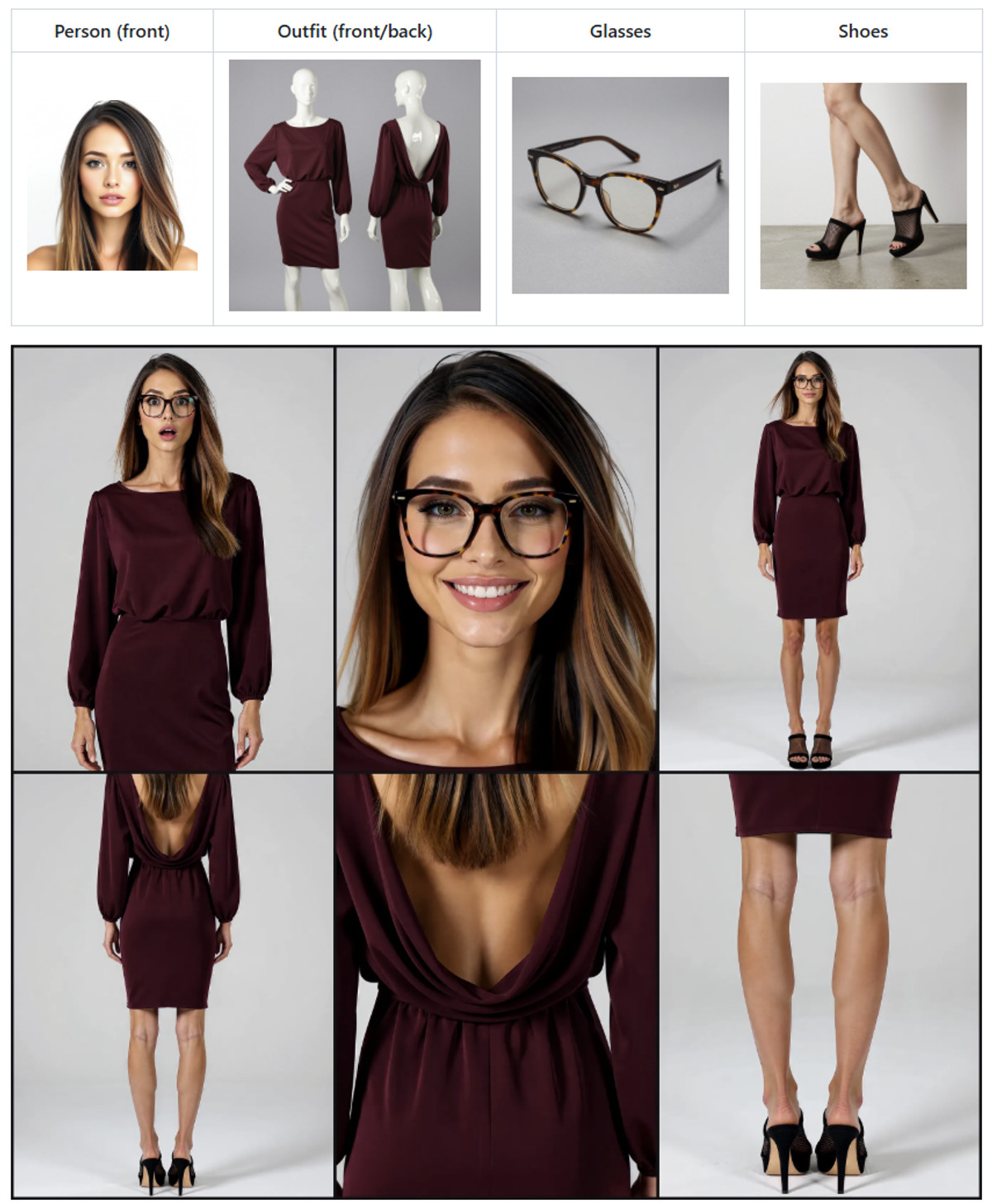
Reasons for Recommendation
- Version update: Added ComfyUI-H3LookSheets-2StageSamplingUpscaleRelayVSR.json, replacing SeedVR2 with ComfyUI's built-in RelayVSR x2 upscaling, which upscales the entire video after H3 Face Refine and before Select Frames; the original SeedVR2 workflow was only renamed
- Tool itself: Qwen3-VL first describes each reference image, then automatically writes shot prompts based on selected body parts × camera angles, H3 captures all angles in one video, and Select Frames picks the best and most distinct frames for layout
- Serves tasks like character consistency, clothing lookbooks, LoRA training set preparation, and clothing references
- Free, with 56 downloads within 9 hours of release, and 728 total downloads on the model page
How to Use
- git clone ComfyUI-H3LookSheets into custom_nodes and drag the corresponding workflow into the canvas; the RelayVSR version requires ComfyUI v0.45.0 or newer, while the SeedVR2 version retains old requirements
- The author's example uses the int8 ref2va model + 4-step turbo LoRA, with Qwen3-VL (qwen3vl_4b_fp8_scaled) as the vision model
- Keep hairstyles consistent for the same person in reference images; if clothing photos show someone else, crop out the head first; assign each clothing image to its corresponding slot
Risks and Limitations
- This version only adds an upscaling option; users already on v1.2 who can run SeedVR2 do not need to update
- Heavy dependency on post-processing (latent upscaler, H3 Face Refine, KJNodes, Impact Pack, etc.), which this tool did not run
- Civitai only has 1 example images (another 1 sensitive-level ones are hidden); the demo video is in the author's YouTube playlist
[A] Minimax Female Accents · v1.2
LoRA · Version Update · Author imb101 · Published 11-22 05:25 · Downloads 97
A collection of female accent LoRAs that only modify the audio part of H3, with one file per accent, allowing characters to speak with specified English accents; v1.2 adds 6 new accents: Manchester, Mexican, Northern Irish, Romanian, Russian, and Quebec French.
(Editor upgraded to A: Usage, weights, and trigger syntax are clear, with many new accents, but only 1 examples are provided.)
Image

Reasons for Recommendation
- Version update: Added 6 new accents; compressed the DIM of the earliest 5 accents (Utah, Atlanta, New Jersey, Liverpool, Minnesota) from 32 to 8, reducing file size, with the author claiming waveforms are nearly identical; all packaged into one zip, with individual files also uploaded
- Solves the issue of H3's default accents being flat: The author claims it only affects the audio layer without impacting visuals, suitable for assigning specific accents to female characters in image-to-video / text-to-video generation
- Unified prompt syntax: Add 'in a <accent name> accent' before or after the dialogue; for Quebec, write 'Quebecois'
- Free, with 97 downloads and 14 likes within 4 hours of release, and 1256 total downloads on the model page
How to Use
- Load the corresponding single LoRA for each accent, with weight 0.6-0.8, and set audio sampling to 3 (increase if strange bubble sounds appear)
- Write dialogue in the form 'The woman says [English]…… in a manchester accent'; the accent name can be placed before or after the dialogue
Risks and Limitations
- One LoRA per accent; it is not possible for two people to speak in different accents in the same generation; only targets female voices
- Only 1 visible example videos (another 1 are hidden); the author admits some accents are strong while others are weak
- Security scan for the zip archive is incomplete; the files contain both Quebecois and Quebecois-French versions, with no explanation of the difference; the license does not allow derivatives
Worth Watching (3)
[B] MiniMax H3 Voice Cloning (Audio Only) · v1.0
Workflow · New Model · Author NekoCap · Published 11-22 07:20 · Downloads 51
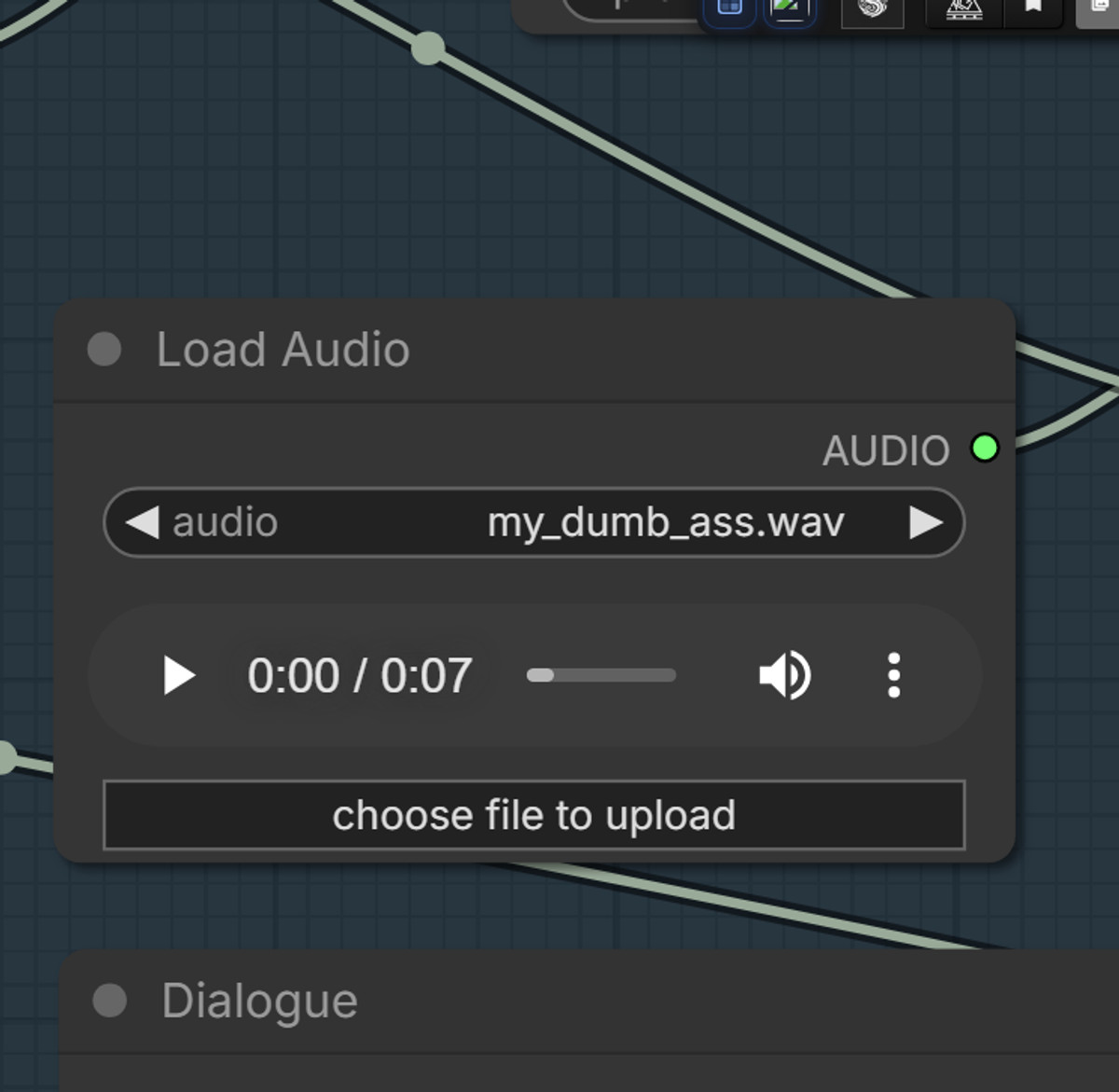
A ComfyUI workflow for voice cloning using H3's audio generation: Provide a clean single-person voice sample to output only audio mimicking that timbre.
(Editor downgraded to B: No examples, and parameters and dependencies are not specified.)
Image
Reasons for Recommendation
- New model: For tasks requiring only audio, such as dubbing or character dialogue, the author claims "the results are decent," but also describes it as a "silly experiment"
- Clear sample requirements: Only single-person vocals are needed; slight background noise or instrumental music without lyrics has little impact; samples with multiple mixed voices will confuse H3
- Free, 51 downloads in the first 2 hours after release
How to Use
- Download MiniMax-H3_Voice-Clone.json, import it into ComfyUI, and provide a single-person vocal sample
- The required nodes, models, and parameters are not provided by the author
Risks and Limitations
- There are no audio or video examples; the only preview image is a statement that the author believes Civitai may not welcome realistic previews
- Cloning someone else's voice carries legal and ethical risks; the author explicitly disclaims liability. Ensure you have authorization for the sample voice before use
- The description is extremely brief, and the dependent nodes and models must be verified by the user. This tool has not been tested
[B] OmegaWPN YouTube, Facebook, Pinterest and Instagram Loader + Viewer · v0.4
Other · Version Update · Author OmegaWPN · Released 11-22 00:49 · Downloads 28
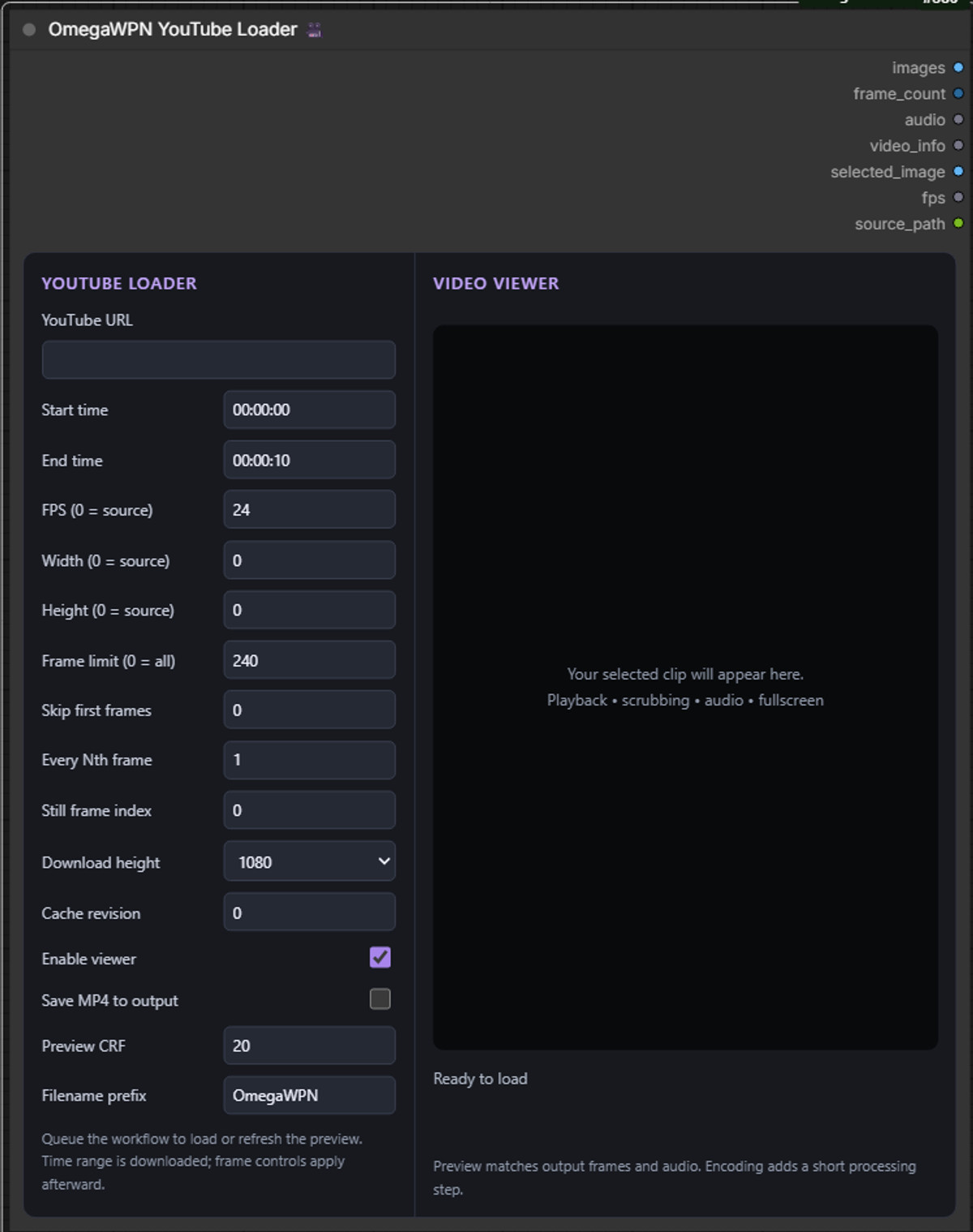
ComfyUI video loading node: Paste a YouTube, Instagram, Facebook, Pinterest, or direct video URL, download only a segment based on start and end times, and output frames, audio, and a selected single frame, with a player preview next to the node.
Included as a utility: It is not directly tied to H3, making it suitable for those who need to capture reference clips from the web.
Image
Reasons for Recommendation
- Version update: v0.4 expands from a YouTube loader to a general video loader, supporting various sites and direct links that yt-dlp can fetch; allows adjustment of FPS, resolution, frame skipping, and maximum frame count
- Relationship with H3: It contains no H3 weights or H3-specific nodes; it is a general input tool. The author labels the base model as H3. It can be used to prepare materials for H3's reference-to-video and audio reference tasks, but the author has not provided H3 examples
- Free, 28 downloads in the first 8 hours after release, with a cumulative total of 107 downloads on the model page
How to Use
- Extract to ComfyUI\custom_nodes, and install VideoHelperSuite, yt-dlp, and FFmpeg; YouTube also requires a JavaScript runtime such as Deno
- For the Windows portable version, first run install_portable.bat and "activate youtube (only once).bat" once, then restart and add the OmegaWPN YouTube Loader
- Author's example: Set FPS to 24, duration to 15 seconds, maximum frame count to 360, and set 0 to read all frames within the interval
Risks and Limitations
- This is not an H3 model but a general ComfyUI tool; the installation script is only for the Windows portable version, with the default path hardcoded to C:\ComfyUI_windows_portable
- Downloading online videos involves platform terms of service and material copyright; some sites require login or are not supported
- The license does not allow derivatives; the author has not provided itemized update notes relative to v0.3
[B] img2Vid MiniMax H3 Workflow (12GB VRAM) · v3.0
Workflow · Version Update · Author theevildarkmage126 · Released 11-21 23:07 · Downloads 53
Version 3 of the ComfyUI image-to-video workflow for H3 targeting 12GB VRAM: Switches to the Turbo model, stacks two detail LoRAs, and performs 2x upscaling.
Image

Reasons for Recommendation
- Version update: v3 switches to the Turbo checkpoint, uses LoRA Manager to attach two detail LoRAs, and finally performs 2x upscaling; the author claims that on an RTX 4070, a 5-second video takes about 6 minutes, with acceptable quality
- Serves image-to-video users with limited VRAM; the previous version's Quick (4 steps) / Standard (20 steps) two-tier approach was designed for quickly tuning prompts first, then refining
- Free, 53 downloads in the first 10 hours after release, with a cumulative total of 878 downloads on the model page
How to Use
- Import MiniMax_H3_V5xs_Turbo6_MultiLoRA_RTX2x.json, and additionally install ComfyUI LoRA Manager, ComfyUI NVIDIA VFX Nodes, and ComfyUI KJNodes
- The names of the two detail LoRAs and the step counts are not specified in the v3 description by the author
Risks and Limitations
- The author has not written update notes (the version description is empty, and v3 content is only in the first few lines of the model card)
- The only example is sensitive and hidden, so the effect cannot be previewed; the license does not allow commercial use or derivatives
- Dependent nodes and models must be verified by the user; this tool has not been tested
- The card image is an AI-generated diagram, not the actual model output; the author has no public non-sensitive examples
Included Only (3)
- Kermit the Frog Muppet Minimax H3 Refmod · v1.0 — LoRA: A character reference file for the puppet frog Kermit. The author claims it combines both appearance and voice references in one file, used for H3 reference-to-video to have this puppet character appear and speak.

- onef0x · v1.0 medium — LoRA: A practice character LoRA by the author. The trigger word onef0x is bound to a specific humanoid character. The author states it affects the entire image like a style LoRA.
- Single above knee hopping · Minimax — LoRA: An action LoRA: Makes a character with an above-knee amputation on one leg hop on the other leg.

Data: Civitai Public API (Base Model MiniMax H3), inclusion window 11-21 20:31 → 11-22 09:01 (Beijing Time). Reasons for recommendation have been editorially reviewed; download counts only reflect attention.