Zhenzhen's AI Radar · Qwen Image 2.1 · 2026-11-01 Morning Brief
This issue features 4 new versions: Strongly Recommended 0 · Recommended 1 · Worth Watching 2 · Listed Only 1
Editor's Note This issue reviews 5 new Qwen 2.1 versions. The top pick is the Qwen 2.1 version of Candid Amateur iPhone: a style LoRA that removes studio lighting and posed looks, replacing them with the texture of casual smartphone snapshots. It includes 4 sets of same-seed comparisons with and without the LoRA, along with trigger words, strength, the accompanying Turbo LoRA, and sampling parameters. It maintains an S rating (note that the base model has a non-commercial license). Another highlight is a side-by-side comparison workflow for three editing models: Qwen 2.1, Flux.3 Klein, and Fibo 2. The author labels the base model as Flux.3 Klein, but it indeed calls Qwen 2.1 for editing, and all 6 comparison images are visible, upgrading it from C to A; the Character Asset workflow v1.1 only fixed the three-view prompts, and the VLM planning outfit-change workflow has heavy dependencies and no visible examples, so both maintain a B rating; the Claude-chan character LoRA lacks generation parameters, and the examples are homogeneous batch images, downgrading it from A to C.
Recommended (1)
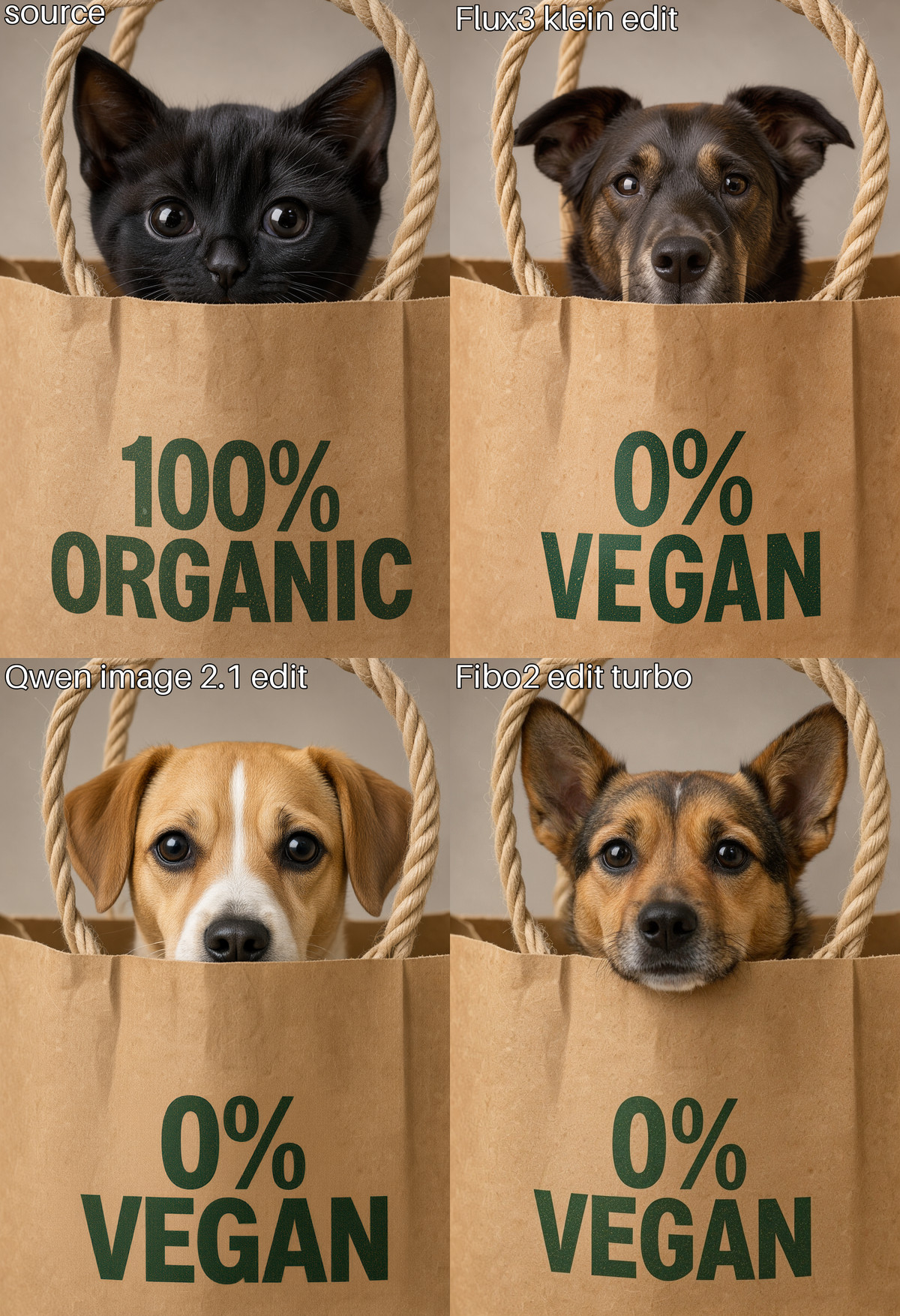
[A] Qwen image 2.1 Edit vs Flux 3 Klein edit vs Fibo 2 edit turbo · v1.0
Workflow · New Model · Author def813 · Published 11-01 07:34 · Downloads 6
An editing model comparison workflow: the same image and the same editing instruction are fed into Qwen Image 2.1 Edit, Flux.3 Klein Edit, and Fibo 2 Edit Turbo, producing a labeled four-panel grid output of "original image + three results."
Upgraded from C to A: The purpose is clear, all 6 comparison examples are visible and include prompts, and all three sampling settings are written into the workflow; what is missing is the model list on the card, and it only serves selection comparison.
Images
Reasons for Recommendation
- New model (the author labels the base model as Flux.3 Klein): Both the name and the workflow directly call Qwen Image 2.1 Edit (using the turbo int8 base model with 8 steps and manual sigma scheduling), confirming it is indeed used for Qwen 2.1, so it is retained in this section.
- Serves the need to compare three editing models on the same asset and decide which to use; each model has a toggleable prompt enhancement (off by default), and the output size can automatically follow the original image.
- All 6 visible examples are four-panel comparisons (changing package text, changing hairstyle/makeup, adding hat/sunglasses, converting to anime style, etc.), all with prompts; the author states that 4 images at 1024x1024 take about 20 seconds on 5070ti and about 40 seconds on 5060ti.
How to Use
- Import qwenImage21EditVsFlux3_v10.json (48 KB), replace the source image in LoadImage, write the editing instruction in the Prompt node, and enabling the overlay switch will add labels to each panel; the author did not list which nodes are required.
- You need to prepare three sets of models: qwen_image_2.1_turbo_int8_convrot + qwen3vl_8b_int8_convrot + qwen_image_2.1_vae_bf16; flux3-image-klein-int8-convrot + qwen3vl_4b_int8_convrot + flux2-vae; fibo2_edit_turbo_int8_convrot + qwen3vl_4b_bf16; enabling prompt enhancement also requires their respective enhancement models, but the author did not provide download locations.
Risks and Limitations
- The model card has only two sentences, with no model list or download locations; you must inspect the workflow yourself.
- It is only a comparison tool and does not provide new capabilities; the comparison conclusions only represent the few images chosen by the author; real brand logos appear in the examples.
- The license does not allow commercial use; there were only 6 downloads in the approximately 1 hours since publication; this entry only read the workflow content and was not run.
Worth Watching (2)
[B] Qwen Character Asset Generator (Emotion/Action/Angle) Workflows · v1.1
Workflow · Version Update · Author Zovetry · Published 11-01 05:09 · Downloads 24
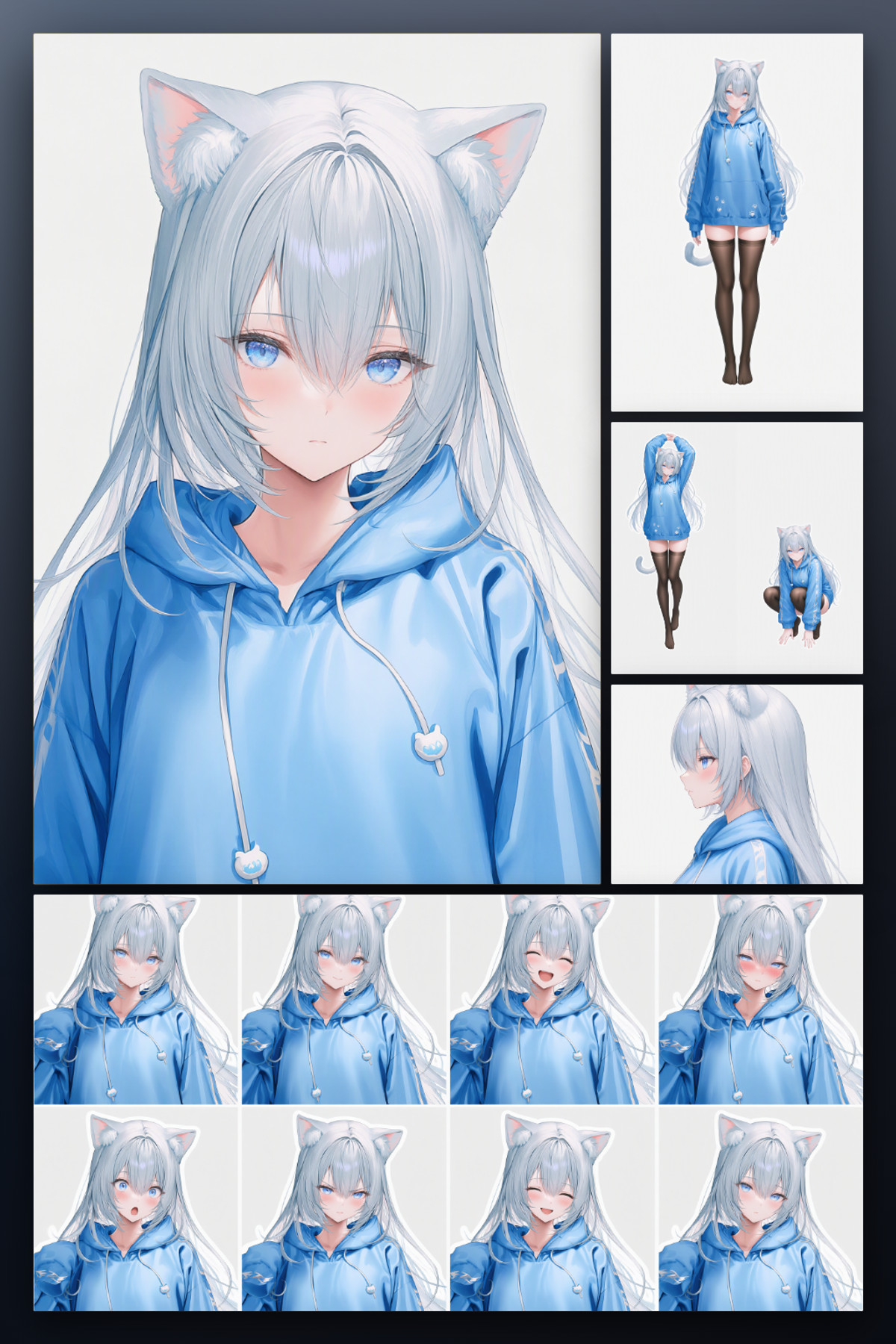
A Qwen 2.1 ComfyUI workflow v1.1 that generates a complete set of character assets (8 expressions, 24 actions, 12 camera angles, and one turn-around three-view sheet) from a single character reference image; it is not a new weight itself.
Maintains B: Fixed the three-view prompts and added 1 visible examples, but parameters are still off-site, and there are too few visible examples.
Images
Reasons for Recommendation
- Version update: The update note is only one sentence—fixed some description issues in the three-view prompts; the model list and node requirements are the same as the previous version.
- Serves the need of "having only one character image and wanting to expand the training set or create standing illustration assets"; the author claims it runs in one pass, maintaining consistency of face, clothing, and lighting across frames, and can run on 8GB VRAM.
- This version has 1 visible examples (turn-around images and expression grids for a blue hoodie cat-ear character), whereas the previous version had no visible examples; it is free, and the license allows output, rental, sale, and sale of fusions; there were 24 downloads in approximately 4 hours since publication (representing only attention level).
How to Use
- First manually install the five node packages: Easy-Use, rgthree-comfy, KJNodes, essentials, and Comfyroll, then import qwenCharacterAsset_v11.zip (31 KB).
- Place qwen_image_2.1_turbo_int8_convrot.safetensors in models/diffusion_models, qwen3vl_8b_int8_convrot.safetensors in models/text_encoders, and qwen_image_2.1_vae_bf16.safetensors in models/vae; the author directs users to check RunningHub for parameters like step count, which are not provided on the card.
Risks and Limitations
- 15 sensitive-level examples are hidden, with only 1 visible, so consistency between panels cannot be fully judged.
- The card summary and body contain multiple RunningHub invitation code promotions, and parameters require jumping off-site.
- The commercial license checked on Civitai applies only to the workflow file; the Qwen 2.1 base model license needs separate verification; this entry was not run.
[B] ComfyUI Workflows · Qwen Edit Pipeline
Workflow · Port · Author MidFR · Published 11-01 01:37 · Downloads 19
A set of Qwen 2.1 character editing ComfyUI workflows: First, Qwen3-VL reads the image and your one-sentence instruction to determine if it is an outfit change, color change, partial edit, background edit, or pose edit, and completes the prompt; when preserving the character outline is needed, it uses depth measured by Sapiens2 to drive Qwen Union ControlNet.
Maintains B: The idea of VLM planning plus depth-controlled outfit editing is clear, but the model card does not describe this version, there are no visible examples, and dependencies are heavy.
Images

Reasons for Recommendation
- Port: The author's "ComfyUI Workflows" collection page previously had versions for MOSS single-image editing, H3 reference-to-video, etc.; this version is the Qwen 2.1 editing pipeline; the model card does not introduce this version, so the above content comes from the instruction card included in the workflow.
- Serves character outfit changes, color changes, and background swaps—edits that "change clothes but not body shape or face"; for color changes and minor edits, the planner turns off depth control and performs direct reference image editing.
- The workflow also includes branches for extracting characters into 3D models and saving poses (SAM 3D Body, Trellis2, Pixal3D, MoGe); it is free, and the license allows output, rental, sale, and sale of fusions.
How to Use
- Clone midfr-comfyui-nodes to custom_nodes, then install ComfyUI-Sapiens2, and import comfyuiWorkflows_qwenEditPipeline.json (281 KB); write editing requirements in plain language in the planner node, as sampling parameters are already written into the workflow.
- Base model qwen_image_2.1_turbo_int8_convrot, text encoder qwen3vl_8b_w4a8, VAE qwen_image_2.1_vae_bf16; advanced editing additionally requires Qwen-Image-2.1-Fun-Controlnet-Union, Qwen3-VL-4B-Instruct-heretic (placed in models/LLM), and two Sapiens2 models.
Risks and Limitations
- The model card does not introduce this version at all; the purpose can only be seen by inspecting the built-in instructions after import; there are no visible examples (1 sensitive-level items are hidden).
- Heavy dependencies: Advanced editing and 3D extraction require over ten model files; the workflow itself states that download sources for files other than the two Sapiens2 models are unverified; the LLM used for planning is the heretic version with refusal responses removed.
- This entry only read the instructions in the workflow and was not run.
- The card image is an AI-generated diagram, not the actual effect of the model; the author has no public normal-level examples.
Listed Only (1)
- Claude-chan · Qwen2.1-Claude-chan — LoRA: A Qwen 2.1 character LoRA for the original cute character "Claude-chan" (an anthropomorphic character based on the AI assistant Claude), with training images produced by modifying GPT Image 2.5.

Data: Civitai public API (base model Qwen 2.1), inclusion window 10-31 20:31 → 11-01 09:01 (Beijing Time). Reasons for recommendation are editor-reviewed; download counts represent only attention level.