Zhenzhen's AI Radar · Qwen Image 2.1 · 2026-11-03 Morning Briefing
This issue features 4 new versions: Strongly Recommended 0 · Recommended 2 · Worth Watching 1 · Listed Only 1
Editor's Note This issue reviews 4 new versions of Qwen 2.1. The top pick is the Regular version of AusBoss's multi-image editing workflow: it swaps clothing, hairstyles, or scenes from other images into image 1, with boxes above each reference image specifying which parts to extract, catering to users without the Turbo base model. The Transparent Edge Fix LoRA has specific use cases, complete strength and prompt details, rated A; FrameLoom integrates LLM dialogue, reference image roles, and image generation into a single workflow, offering many features but relying on OpenRouter or a local LLM, rated B; the author of the Claude-chan Qwen version did not provide update notes, rated C.
Recommended (2)
[A] Qwen Image 2.1 Multi-Image Edit | Regular + Turbo · v1.2 Regular
Workflow · Version Update · Author AusBoss · Published 11-03 08:19 · Downloads 15
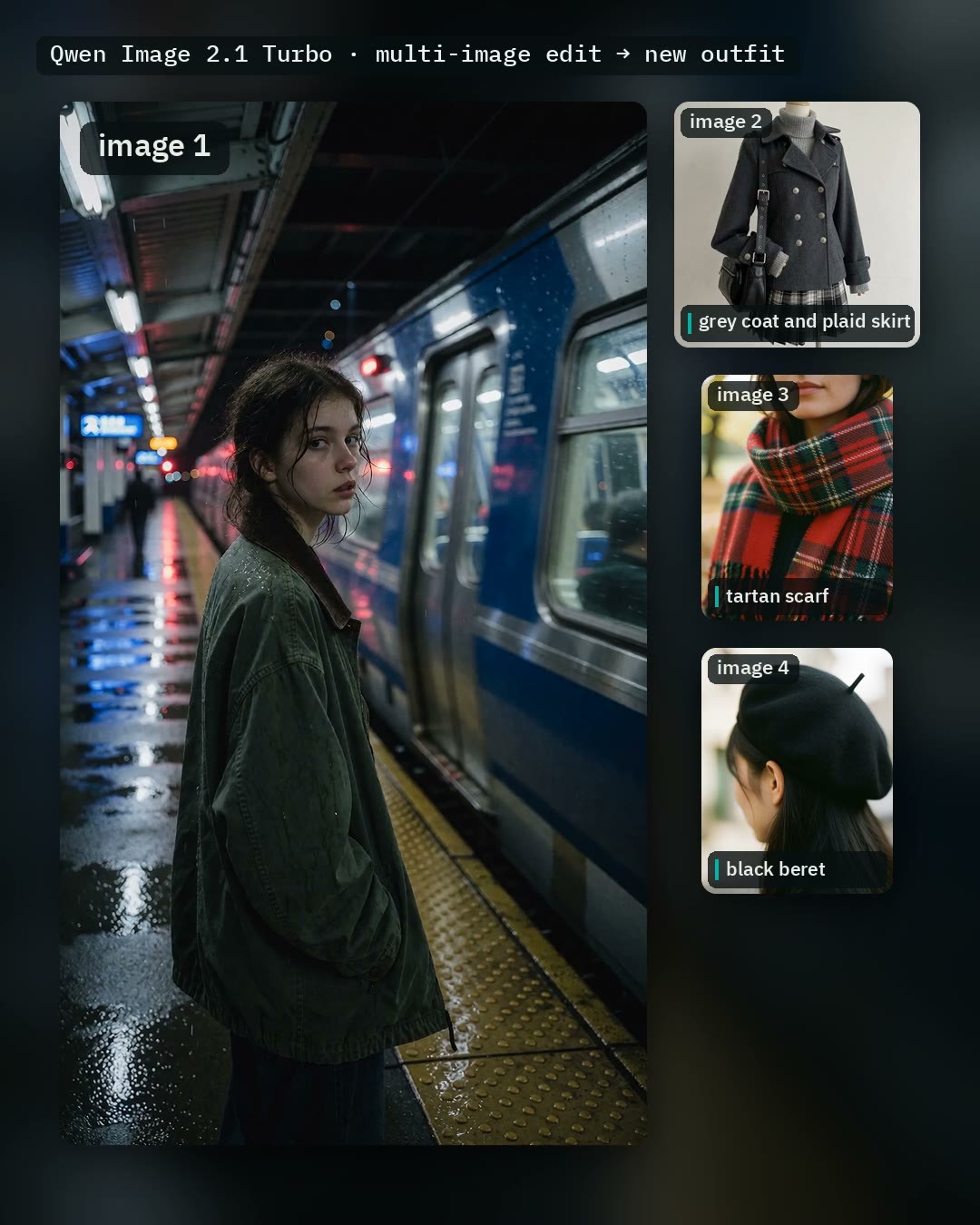
The standard model version of the multi-image reference editing workflow: it swaps the person in image 1 with clothing from up to five other images, and can also extract hairstyles, locations, and lighting; this version runs on the standard Qwen Image 2.1 base model, catering to users without the Turbo base model.
Rated A (Top Pick): Use cases, parameters, dependency versions, and operation steps are clearly documented; deductions are for relying on the author's custom nodes and having fewer examples for the Regular version.
Images
Reasons for Recommendation
- Version Update: The same workflow previously only ran on the official Turbo base model (8 steps); this version switches to the standard base model with 25 steps and adds a Fast toggle (Viggle Turbo LoRA + 8 steps); the author claims that editing two images totaling 2 megapixels takes about 25 seconds on an RTX 5090, and about 8 seconds with Fast enabled
- Serves multi-reference image editing tasks such as outfit swaps, borrowing hairstyles, and background changes; Auto prompt has three modes (clothes / normal / off), where Qwen analyzes the images to automatically write complete instructions, requiring no additional model downloads
- The documentation is actionable: specify the parts to extract in the box above each image (e.g., "jacket", "red shorts"), and the author provides solutions for common failures; the model page shows a total of 2639 downloads and 104 likes (indicating attention level only)
How to Use
- Requires ComfyUI 0.38 or higher, and AusBoss nodes 2.15.0 or higher (update via ComfyUI-Manager and restart first); the Fast toggle requires the Viggle Turbo LoRA (link in workflow comments)
- Place the image to be edited in slot 1, place reference images starting from slot 2 and enable their toggles individually, specify what to extract in the box above each image, then run; for edits other than outfit swaps, switch Auto prompt to normal
- Users with the Turbo base model should select v1.2 (Turbo version) on the same page; the workflows are identical
Risks and Limitations
- The model list on the model page is for the Turbo version; for the Regular version, check the links in the workflow comments
- This version has only 1 video examples, with another 1 hidden; it relies on the author's custom node package and LoRA; this entry has not been tested
[A] Q2.1 Fix Contour LoRA (Transparency) · v1.0
LoRA · New Model · Author CogDiffusion · Published 11-03 05:27 · Downloads 43
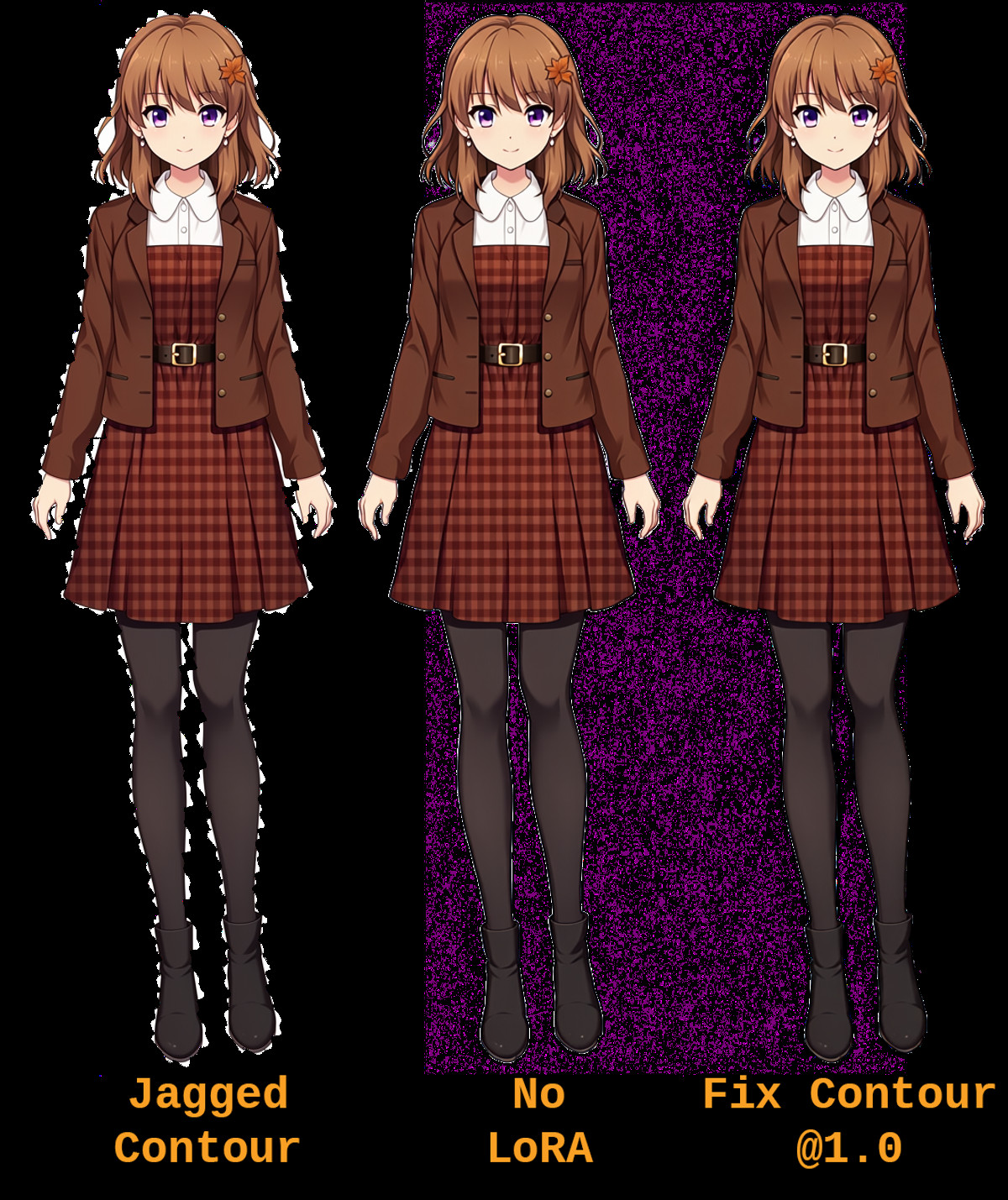
An editing LoRA for fixing the edges of subjects with transparent backgrounds: Qwen 2.1 often produces jagged edges and artifacts when editing images with transparent contours; this LoRA smooths the contours with a single instruction and can also assist with background removal.
Suitable as the final step in a transparent image editing workflow for edge refinement; can be compared against results without the LoRA using the same seed.
Images
Reasons for Recommendation
- New Capability: Trained by the author using FizGig's RGBA transparency training support, targeting the issue of jagged edges and artifacts when Qwen 2.1 edits transparent images
- Serves editing tasks requiring clean transparent edges, such as stickers, e-commerce cutouts, and game assets; the author claims that in same-seed comparisons, background removal is closer to the original image than without the LoRA
- The author documented the training set composition (photos, paintings, 3D renders, one set with solid backgrounds and one with bad contours) and training parameters; it is free
How to Use
- Strength 1.0; lower than 1.0 weakens the effect, higher than 1.0 introduces additional artifacts
- Prompt: "Fix the subject’s contour in areas that need fixing. Preserve well defined areas." (Training description was "Fix the subject’s contour."); for background removal, use "Remove the background."
- Steps and CFG were not provided by the author
Risks and Limitations
- The author admits it is imperfect: Qwen 2.1 tends to brighten contours, which this LoRA does not resolve; the author also acknowledges that Qwen 2.1 handles transparent images reasonably well on its own
- Only 1 visible examples (5 hidden), and only one checkpoint at epoch 10; this entry has not been tested
Worth Watching (1)
[B] FrameLoom - Qwen-Image-2.1 // Cloud & Local LLMs Inside ComfyUI · v1.0
Workflow · New Model · Author BeastModeOn · Published 11-03 07:50 · Downloads 11
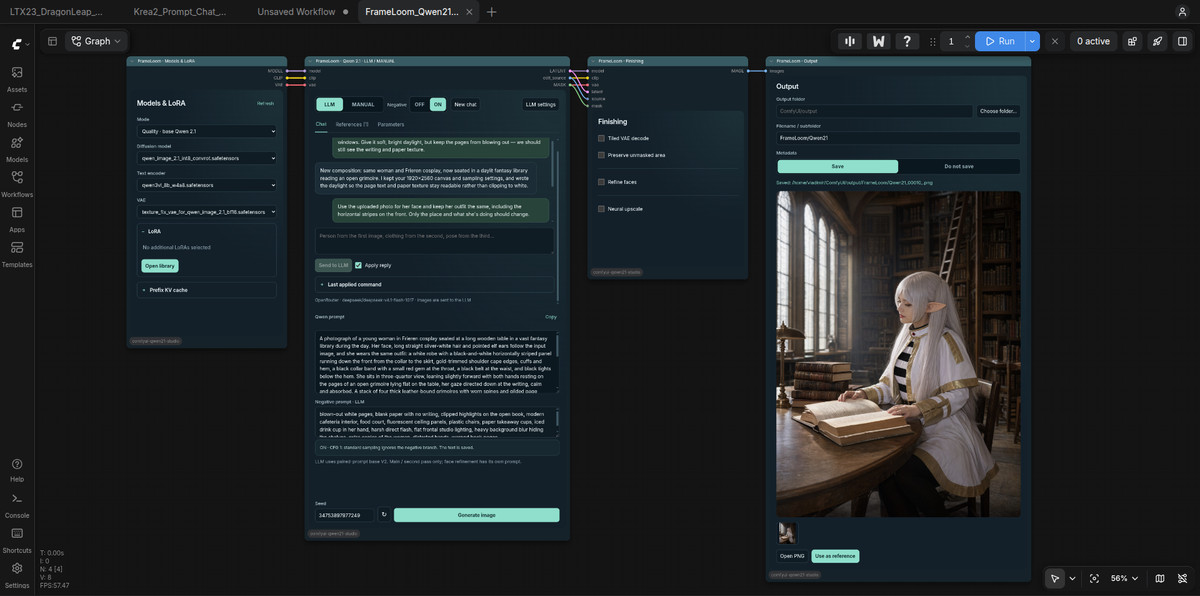
Integrates LLM dialogue, reference image roles, and Qwen Image 2.1 generation into a single ComfyUI workspace: discuss composition with an assistant, assign roles to each reference image, and generate only after confirming the prompt.
Rated B: Feature-complete with detailed documentation, but relies on LLM services and multiple optional components, lacking comparable finished workflow examples.
Images
Reasons for Recommendation
- New Tool: Built-in 14 image tasks (new images, edits, text layout, transparent images and background removal, inpainting and outpainting, identity/clothing/pose/style references, etc.), with the assistant applying different system instructions based on the selected task
- Serves image generation requiring multiple rounds of discussion, such as multi-reference composition, iterative modifications, and character design; chat and generation are separated, so generating another image does not re-call the LLM
- Can connect to cloud OpenRouter or local LM Studio/Ollama on the same machine; also includes branches for LLM/MANUAL toggle, positive/negative prompt linkage, LoRA library, optional Union ControlNet, secondary sampling, face restoration, and upscaling
How to Use
- Download the zip and import into ComfyUI; the author recommends using larger models on OpenRouter (register an account to generate an API Key, choose a free model or enter openrouter/free in the model field), or connect to a local LLM
- Select the task in Parameters before sending messages; image analysis requires a vision-capable LLM and enabling Send images; negative prompts do not work when CFG is 1, and the author states that the negative mode with Turbo LoRA at CFG 1.1 is experimental
- Optional branches (ControlNet, GGUF, local prompt enhancement, etc.) each require corresponding weights and nodes, and are disabled by default in public examples
Risks and Limitations
- Relies on external LLM services or local LLMs; experience depends on the selected model and VRAM; API Keys are stored in browser storage
- Only 3 visible examples (1 hidden), and the list of required custom nodes is not provided; the native folder selector currently supports only Linux (Zenity)
- Launched about 1 hours ago, with 11 downloads for this version; this entry has not been tested
Listed Only (1)
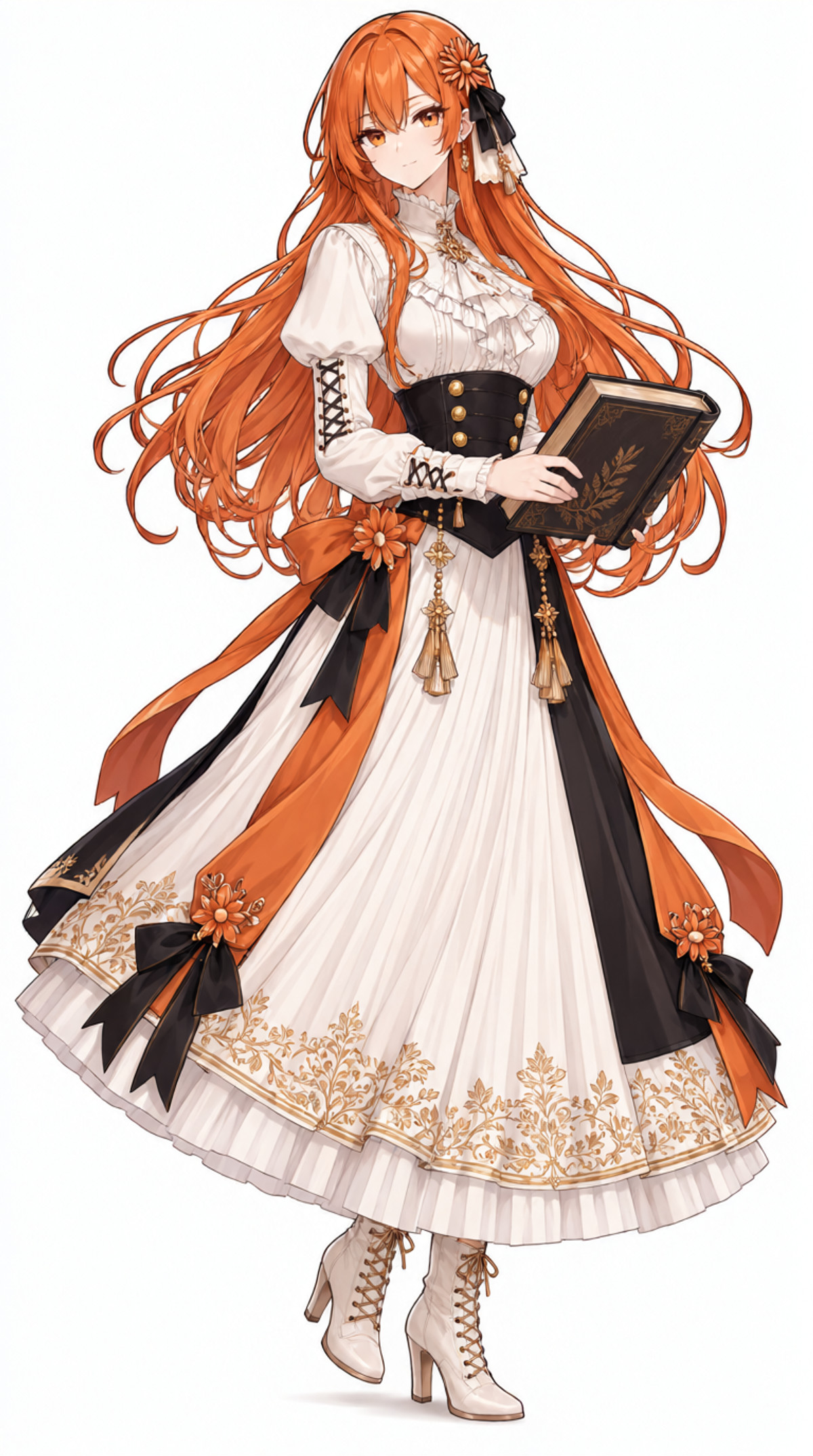
- Claude-chan-Claude chan · Qwen2.1-Young Claude-chan — LoRA: A Qwen 2.1 version LoRA of the anthropomorphized Claude character "Young Claude-chan," trained on images modified by GPT Image, sharing a model page with the Q-version.
Data: Civitai Public API (Base Model Qwen 2.1), collection window 11-02 20:31 → 11-03 09:01 (Beijing Time). Recommendation reasons have been reviewed by editors; download counts indicate attention level only.